Unlocking the Secrets of the Linux File System: A System Investigator's Journey
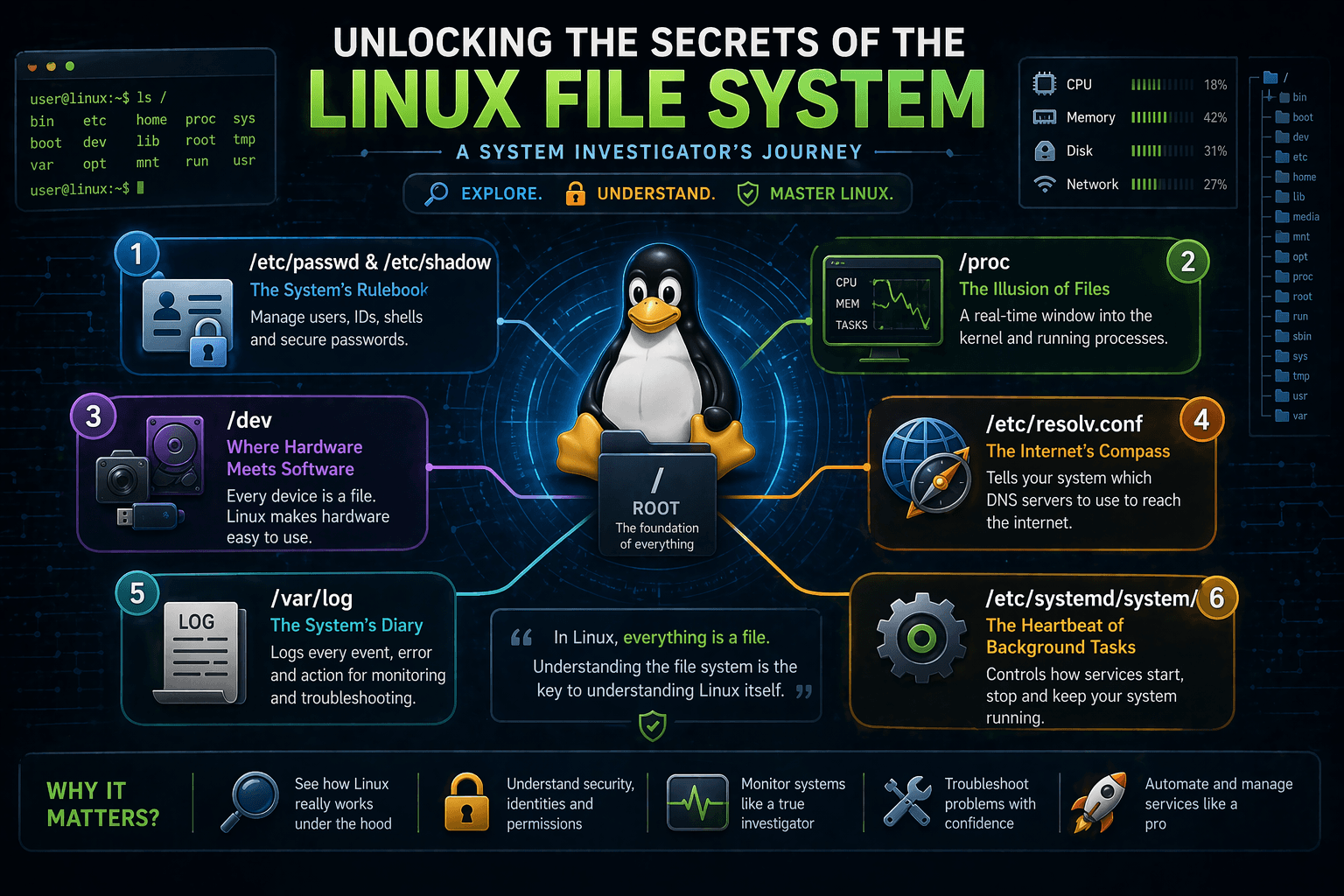
When you use a computer, you usually think of the file system as just a place to store your pictures, videos, and code files. But in Linux, the file system is much more than a storage box. It is the actual control panel for the entire operating system. In Linux, there is a famous saying: Everything is a file. Your hard drive, your webcam, your active memory, and your network connections—they are all represented as files.
In this blog, we will step into the shoes of a system investigator. We will understand how Linux actually works under the hood by exploring its file system structure. We will dive into where user data lives, how the system talks to hardware, where DNS configurations hide, and how processes are managed.
First, let’s understand the central brain of the configuration: the /etc directory.
1. The System’s Rulebook: /etc/passwd and /etc/shadow
What it does: The /etc directory holds all the global configuration files for your system. Inside it, /etc/passwd lists all the registered users on the system, while /etc/shadow securely stores their encrypted passwords.
Why it exists: Linux is a multi-user system. Imagine we want to create an account for a new developer, let's say, name: "Suprabhat", age: 23. Linux needs a centralized way to remember Suprabhat’s user ID, his default shell (like bash), and his home directory.
What problem it solves: Without these files, the operating system wouldn’t know who is allowed to log in, what privileges they have, or where their files should be saved. It solves the problem of identity management.
Interesting Insight: If you open /etc/passwd, you won't actually find any passwords! Years ago, passwords used to be stored there in plain sight. For security, Linux developers moved the passwords to /etc/shadow, which can only be read by the root user (the super admin). /etc/passwd remains readable by everyone so applications know who exists on the system, but the actual security key is hidden away.

2. The Illusion of Files: /proc (The Process Information Pseudo-file System)
What it does: The /proc directory contains directories and files that act as a window into the core of the Linux kernel and running processes. For example, /proc/cpuinfo shows details about your processor, and /proc/meminfo shows your RAM usage.
Why it exists: When you open a Task Manager on Windows, it shows you running apps. In Linux, the system needs a way to expose what the CPU and memory are doing in real-time without requiring complex programming.
What problem it solves: It bridges the gap between the kernel (the core of the OS) and user applications. It allows tools to monitor system health simply by reading text files.
Interesting Insight: /proc is completely fake! It is a "pseudo-file system." It doesn’t exist on your hard drive at all. It is generated dynamically in your RAM by the kernel. When you read a file inside /proc, you are actually querying the kernel directly at that exact millisecond. If you reboot, /proc is completely wiped and rebuilt.

3. Where Hardware Meets Software: The /dev Directory
What it does: This directory contains "device files." Every piece of hardware attached to your computer, your hard disk (/dev/sda), your webcam (/dev/video0), or your mouse, has a corresponding file here.
Why it exists: Linux applications don’t want to write complicated code to talk to different brands of hard drives or webcams. By turning hardware into files, Linux makes life easy for developers.
What problem it solves: It standardizes hardware interaction. To send data to a device, a program just "writes" to that device's file. To read from a microphone, a program just "reads" from the microphone's file.
Interesting Insight: There is a famous file here called /dev/null. It is the system's "black hole." If you have a program that generates a lot of annoying error messages and you want to silence them, you can route the output to /dev/null. Anything sent there is instantly destroyed and discarded.

4. The Internet’s Compass: /etc/resolv.conf
What it does: This file tells your Linux system which DNS (Domain Name System) servers to use when converting human-readable websites (like google.com) into computer-readable IP addresses.
Why it exists: When you open a web browser and type a URL, your computer has to ask someone, "Where is this website?" /etc/resolv.conf contains the IP addresses of the servers it should ask.
What problem it solves: It provides the system with a critical roadmap for internet navigation. Without it, your system wouldn't know how to resolve domain names, and the internet would seem completely broken unless you memorized IP addresses.
Interesting Insight: If you manually edit this file to add a fast DNS server (like Google's 8.8.8.8), you might be surprised to find your changes erased after a reboot! This is because modern Linux systems use background services (like NetworkManager or systemd-resolved) that automatically overwrite /etc/resolv.conf based on the network you just connected to (like a coffee shop Wi-Fi).

5. The System’s Diary: /var/log
What it does: The /var/log directory is where Linux keeps its journals. Every time someone logs in, every time a web server crashes, and every time the system boots up, a note is written here.
Why it exists: Computers do millions of things in the background. If something goes wrong, administrators need a paper trail to figure out what happened.
What problem it solves: It solves the problem of blind troubleshooting. Instead of guessing why a server crashed at 3:00 AM, you can read the logs to see exactly what happened at 2:59 AM.
Interesting Insight: If you manage a public-facing Linux server and look inside /var/log/auth.log (or /var/log/secure depending on your Linux version), you will likely see hundreds of failed login attempts from unknown IP addresses all over the world. These are automated bots trying to guess your passwords. Seeing this in real-time is a powerful reminder of why we use strong passwords and SSH keys!

6. The Heartbeat of Background Tasks: /etc/systemd/system/
What it does: This directory contains configuration files (called "unit files") that dictate how background services, like web servers, databases, or network managers, should start, stop, and behave.
Why it exists: When you turn on your computer, you don’t want to manually type commands to start your database, your web server, and your firewall. You want them to start automatically.
What problem it solves: It provides a structured, automated way to manage the lifecycle of software. If a web server crashes, systemd can look at its configuration file here and know exactly how to restart it automatically.
Interesting Insight: You can create your own custom service in minutes. If you write a simple Python script and want it to run forever in the background, you just create a .service file here, tell systemd where your script is, and Linux will treat your script with the same respect and priority as enterprise-level databases!

Conclusion
Linux is not a black box; it is an open book if you know which pages to turn. By exploring directories like /etc for configurations, /proc for active memory state, /dev for hardware, and /var/log for history, you move from being just a "user" to a true system investigator.
Understanding this file structure helps you see exactly how data is managed, how security is enforced, and how the operating system talks to the physical machine behind the scenes. The next time you are on a Linux terminal, don't just stay in your home folder, take a walk through the root directory and see what secrets you can uncover!