Callbacks in JavaScript: Why They Exist
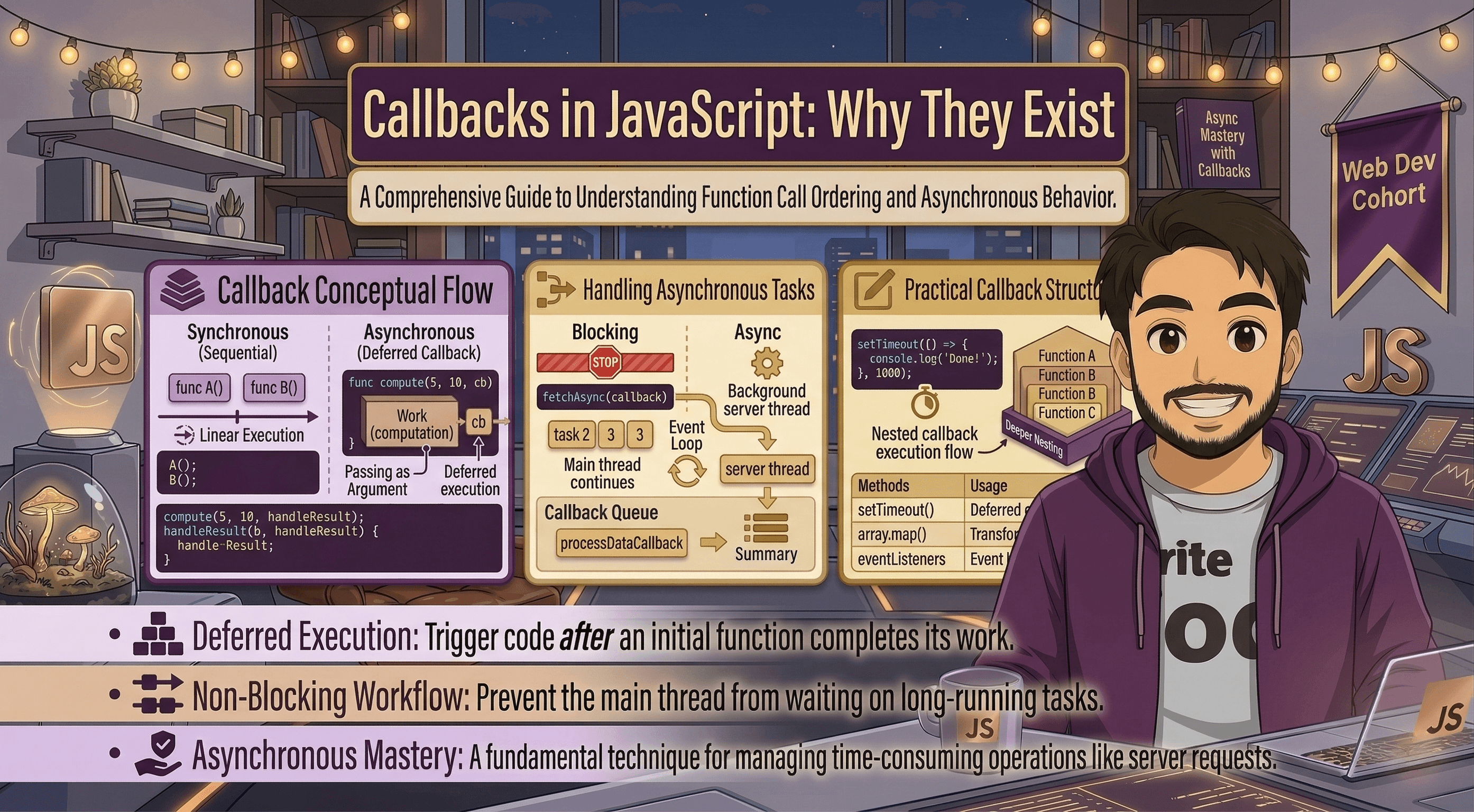
In the world of JavaScript, things happen fast. When you are building a website, your code might need to fetch user data, wait for a user to click a button, or load an image, all at the same time. But if JavaScript doesn't wait for one task to finish before starting the next, how does it know what to do when a task is finally done?
To solve this problem, we use something called Callback Functions.
In this blog, we will understand what a callback function is, why we need it in asynchronous programming, how to pass functions as arguments, common places where callbacks are used, and the basic problem of callback nesting (often called Callback Hell).
First, before jumping into callbacks, let’s understand a superpower that JavaScript has: treating functions as values.
Functions as Values in JavaScript
In many programming languages, variables hold data (like text or numbers), and functions perform actions. But in JavaScript, functions are treated as "first-class citizens." This is just a fancy way of saying that functions can be treated exactly like normal variables.
Because a function acts like a value, you can:
Assign a function to a variable.
Return a function from another function.
Pass a function as an argument to another function.
This third point is the magic behind callbacks.
What is a Callback Function?
A callback function is simply a function that is passed into another function as an argument, and then executed (or "called back") at a later time.
Let’s look at a very simple, everyday example. Imagine you have a function that prints a greeting, and another function that asks for a user's name.
// This is the callback function
function sayHello(name) {
    console.log("Hello, " + name + "!");
}

// This is the main function that takes a callback as an argument
function processUserInput(callback) {
    let userName = "Suprabhat";
    // We call the passed function here
    callback(userName);
}

// We pass the sayHello function into processUserInput
processUserInput(sayHello);
In the example above, sayHello is the callback function. We passed it into processUserInput without parentheses. We don’t want to run it immediately; we want processUserInput to run it when it is ready.
Why Callbacks are Used in Asynchronous Programming
The previous example was "synchronous," meaning the code runs line by line, top to bottom, without stopping. But the web is "asynchronous."
When you request data from a database over the Internet, it takes time. JavaScript is impatient. It will not stop and wait for the data to arrive; it will continue running the rest of your code.
So, how do we handle the data when it finally arrives? Callbacks.
Think of it like ordering food at a busy restaurant:
You go to the counter and order a pizza.
The cashier doesn't make you stand at the register for 20 minutes blocking everyone else. Instead, they give you a buzzer (the callback).
You go sit down and talk with your friends (JavaScript continues running other code).
When the pizza is ready, the buzzer rings (the callback is executed), and you go pick up your food.
Callbacks tell JavaScript: "Go ahead and do this long task in the background. When you are 100% finished, run this callback function to handle the result."
Callback Usage in Common Scenarios
You might already be using callbacks without even realizing it! Here are a few very common scenarios where callbacks are necessary:
1. Timers (setTimeout) If you want to delay an action, you use setTimeout. You pass a callback function and a time in milliseconds.
console.log("Start");

setTimeout(function() {
    console.log("This message is delayed by 2 seconds");
}, 2000);

console.log("End");
Output order: Start -> End -> This message is delayed by 2 seconds.
2. Event Listeners (User Interaction) When waiting for a user to click a button, you don't know when they will do it. So, you give the browser a callback function to run exactly when the click happens.
let myButton = document.getElementById("submit-btn");

myButton.addEventListener("click", function() {
    console.log("The button was clicked!");
});
3. Fetching Data When reading a file or downloading data from an API, you pass a callback to process the data once the download is complete, ensuring your app doesn't freeze while waiting.
The Basic Problem of Callback Nesting (Callback Hell)
Callbacks are incredibly useful, but they have a dark side. What happens when you have multiple asynchronous tasks that depend on each other?
Imagine this step-by-step process:
Find a user in the database.
Once the user is found, find their recent posts.
Once the posts are found, find the comments on the first post.
Because each step takes time, you have to put a callback inside a callback, inside another callback. Conceptually, it looks like this:
getUser(function(user) {
    getPosts(user.id, function(posts) {
        getComments(posts[0].id, function(comments) {
            displayComments(comments, function() {
                console.log("All done!");
            });
        });
    });
});
This is known as Callback Hell or the Pyramid of Doom.
As you can see, the code starts shifting to the right, creating a triangle shape. This creates several problems:
Hard to read: It becomes very difficult to understand what is happening at a glance.
Hard to debug: If an error happens in step 3, tracking down the problem through all the nested functions is frustrating.
Messy code: Managing variables across all these nested layers gets very confusing as your project grows.
Conclusion
Callbacks are a foundational concept in JavaScript. They allow us to pass functions as arguments and handle asynchronous tasks gracefully, ensuring our websites remain fast and interactive without freezing while waiting for data.
However, as applications grow more complex, heavily nested callbacks can make code messy and difficult to maintain. Because of this "Callback Hell," modern JavaScript introduced newer, cleaner ways to handle asynchronous tasks, such as Promises and Async/Await.
Understanding callbacks is the critical first step. Once you master how callbacks work behind the scenes, you will be perfectly prepared to understand how modern JavaScript handles complex data operations on the web!