Async Code in Node.js: Callbacks and Promises
When you start learning Node.js, one concept appears everywhere: asynchronous code. If you come from a background where programs run line by line, this can feel confusing. Why does Node.js handle operations differently? Why can’t we just wait for each step to finish? In this blog, we will break down why async code exists in Node.js, how callbacks work, why nested callbacks become problematic, and how promises solve these issues. By the end, you will have a clear mental model of how Node.js handles asynchronous operations.
Why Async Code Exists in Node.js
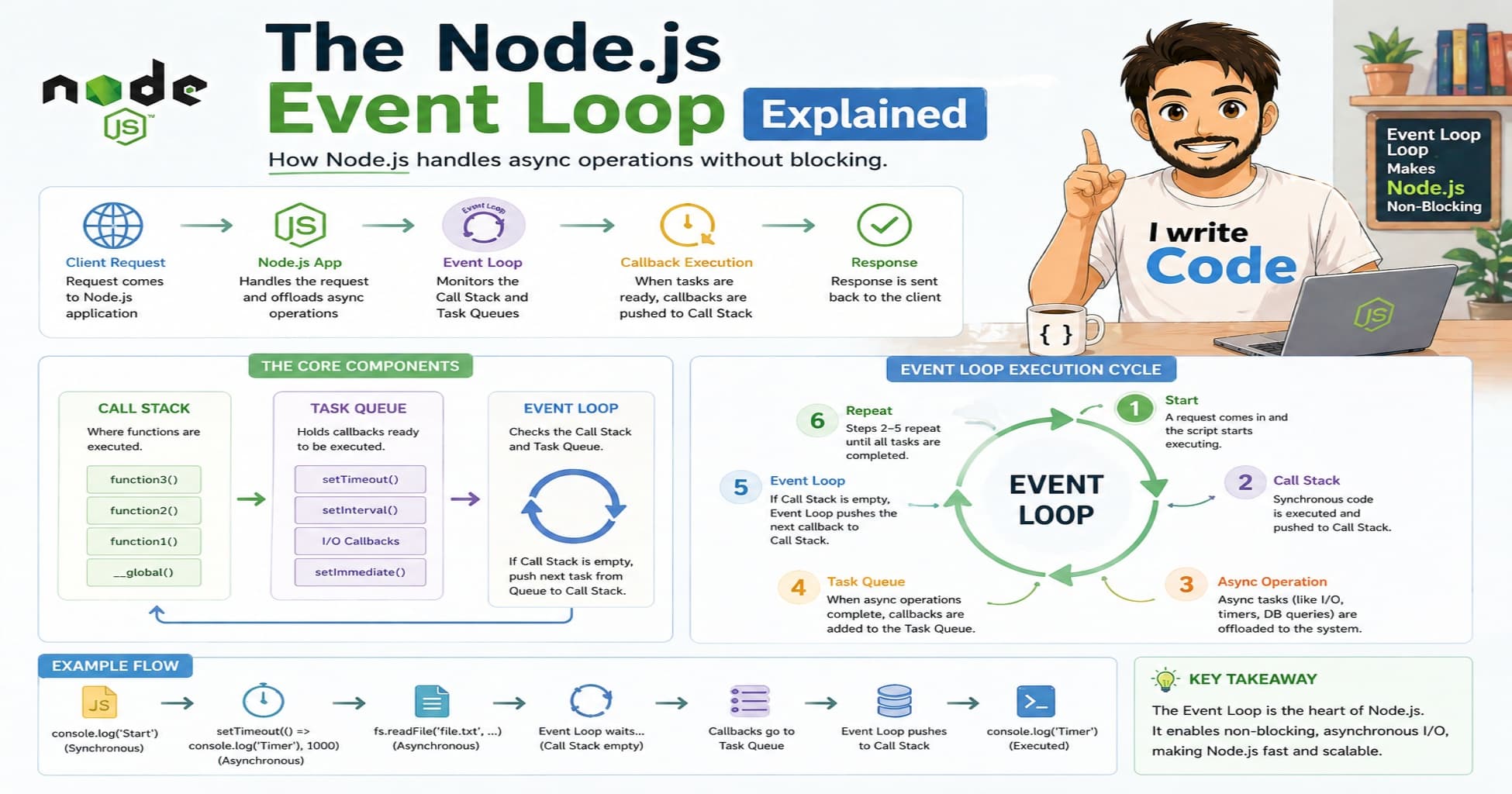
Node.js is built on a single-threaded event loop. This means it can only execute one instruction at a time. At first glance, this sounds limiting. But the internet is full of slow operations: reading files, querying databases, making external API calls, or waiting for user input. If Node.js waited for each of these to finish before moving to the next line, the entire application would freeze. This is called blocking.
To solve this, Node.js uses asynchronous execution. Instead of waiting, it starts a slow operation, registers a function to run when the operation finishes, and immediately moves to the next task. When the slow operation completes, the event loop picks up the registered function and executes it. This keeps the application fast and responsive, even under heavy load.
Think of it like ordering food at a busy café. You don’t stand at the counter waiting for your meal. You get a receipt with an order number, step aside, and maybe check your phone. When your food is ready, you are called to pick it up. Async code works the same way: start the task, step aside, and get notified when it’s done.
Callback-Based Async Execution
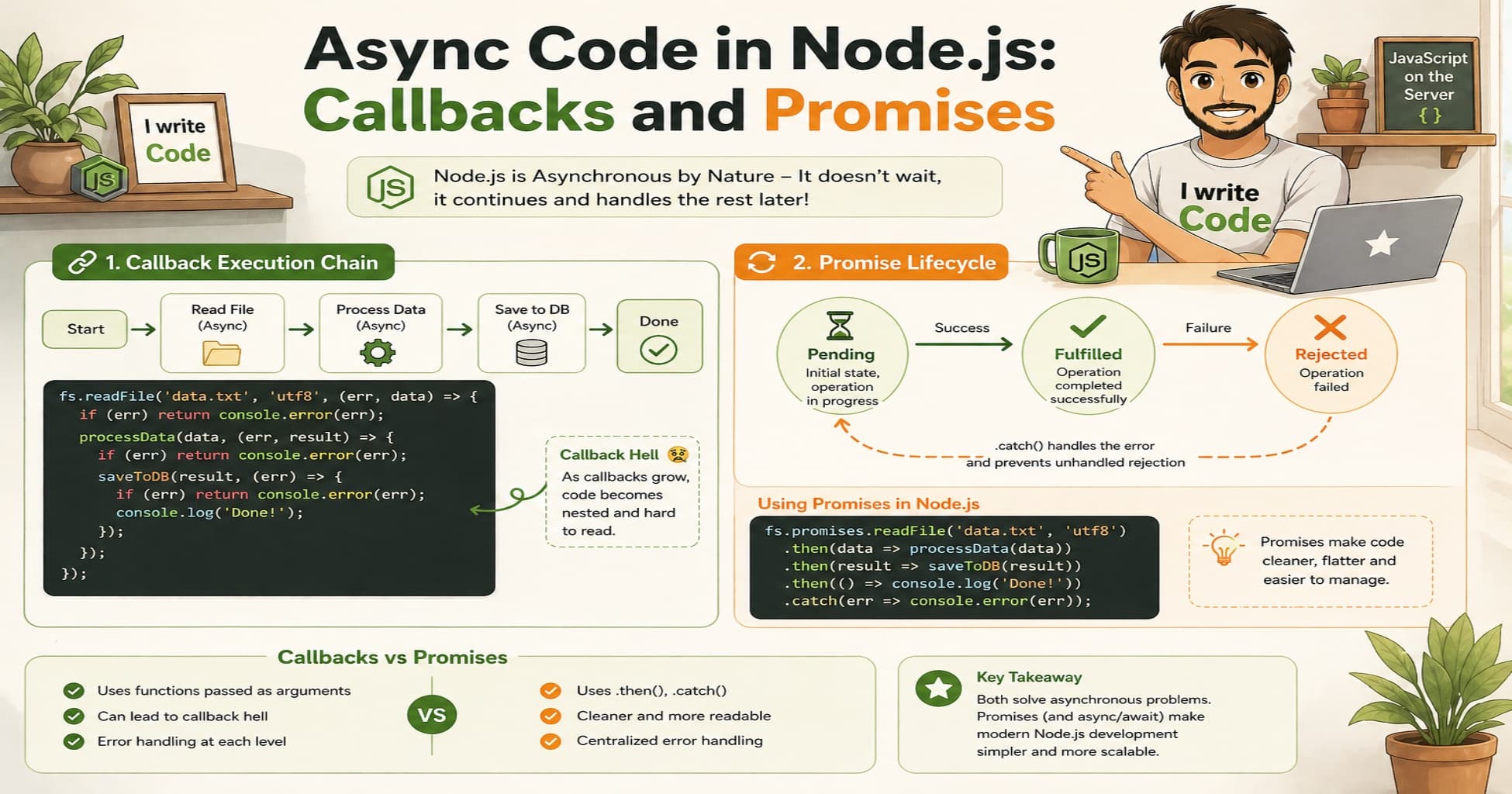
In the early days of Node.js, asynchronous operations relied heavily on callbacks. A callback is simply a function passed as an argument to another function, which gets executed later when a task finishes.
Consider a basic file-reading example:
const fs = require('fs');

fs.readFile('data.txt', 'utf8', (err, data) => {
  if (err) {
    console.error('Failed to read file:', err);
    return;
  }
  console.log('File content:', data);
});

console.log('This message prints first!');
Here, readFile starts reading the file in the background. The callback (err, data) => { ... } waits in line. Meanwhile, console.log('This message prints first!') executes immediately. When the file finishes reading, the event loop triggers the callback. This pattern keeps Node.js non-blocking and highly efficient for I/O-heavy applications.
Problems with Nested Callbacks
Callbacks work well for one or two operations. But real-world applications often require multiple sequential steps. You might need to read a configuration file, then query a database, then format the result, and finally send a response. When you chain callbacks inside callbacks, code quickly becomes difficult to read and maintain. Developers call this “Callback Hell” or the “Pyramid of Doom.”
fs.readFile('config.json', 'utf8', (err, config) => {
  if (err) return console.error(err);
  db.connect(config.dbUrl, (err, client) => {
    if (err) return console.error(err);
    client.query('SELECT * FROM users', (err, users) => {
      if (err) return console.error(err);
      console.log('Fetched users:', users);
    });
  });
});
This structure introduces several serious problems:
Readability drops quickly: The code shifts to the right with every new step, breaking natural reading flow.
Error handling is repetitive: Every callback needs its own
if (err)block, violating the DRY (Don’t Repeat Yourself) principle.State management gets messy: Variables from outer scopes must be manually passed down or scoped carefully.
Debugging becomes painful: Stack traces grow long, and tracking where an error originated takes extra effort.
Imagine a junior developer, name: "Suprabhat", age: 23, trying to maintain a feature built this way. Adding a new step or fixing a bug requires untangling the pyramid, which slows down development and increases the chance of introducing new errors.
Promise-Based Async Handling
Promises were introduced to solve callback hell. A promise is an object that represents the eventual completion (or failure) of an asynchronous operation. Instead of passing a callback, a function returns a promise. You attach handlers to that promise using .then() for success and .catch() for errors.
A promise exists in one of three states:
Pending: The operation is still running.
Fulfilled: The operation completed successfully.
Rejected: The operation failed with an error.
Let’s rewrite the previous example using promises:
const fs = require('fs').promises;

fs.readFile('config.json', 'utf8')
  .then(config => db.connect(config.dbUrl))
  .then(client => client.query('SELECT * FROM users'))
  .then(users => console.log('Fetched users:', users))
  .catch(err => console.error('Something failed:', err));
Notice how the flow is flatter and more readable. Each .then() receives the result of the previous step and passes its own result forward. Errors automatically bubble down to a single .catch(), eliminating repetitive error checks.
Benefits of Promises
Moving from callbacks to promises brings several practical advantages that directly impact developer productivity and code quality:
Cleaner, linear code: No more rightward drift. Code flows top-to-bottom, matching how we naturally read and reason about logic.
Centralized error handling: One
.catch()at the end handles errors from any step in the chain. You no longer need scatteredif (err)blocks.Better composability: Promises can be combined using
Promise.all(),Promise.race(), orPromise.allSettled(). This makes running parallel tasks straightforward and predictable.Foundation for modern syntax: Promises paved the way for
asyncandawait. Under the hood,awaitis simply pausing execution until a promise settles, letting you write asynchronous code that looks synchronous.Predictable execution order: Promises guarantee that
.then()callbacks run in the order they are attached, avoiding race conditions that often plague callback-heavy code.
For teams, this translates to faster feature development, easier code reviews, and more reliable production systems.
Conclusion
Asynchronous programming is the backbone of Node.js. It exists because modern applications spend most of their time waiting for external I/O, not performing heavy computations. Callbacks were the first solution, but nested callbacks quickly became unmanageable as applications grew. Promises solved this by introducing a structured, chainable way to handle async operations, with cleaner syntax and centralized error handling. Understanding this evolution is crucial for any Node.js developer. Once you master promises, you will find that modern features like async/await become second nature. The next time you build an API, read a database, or call an external service, remember: you are not just writing code, you are orchestrating time. Keep experimenting, chain those promises, and let the event loop do its work efficiently.