URL Parameters vs Query Strings in Express.js
Every web application relies on URLs to navigate, fetch data, and trigger actions. But not all URLs are structured the same way. Some carry data directly in the path, while others append information after a question mark. Understanding the difference between URL parameters and query parameters is essential for building clean, predictable, and RESTful APIs.
In this guide, we’ll break down what each type is, how they differ, how to access them in Express, and when to use one over the other. By the end, you’ll know exactly how to structure your routes and handle incoming data with confidence.
What Are URL Parameters?
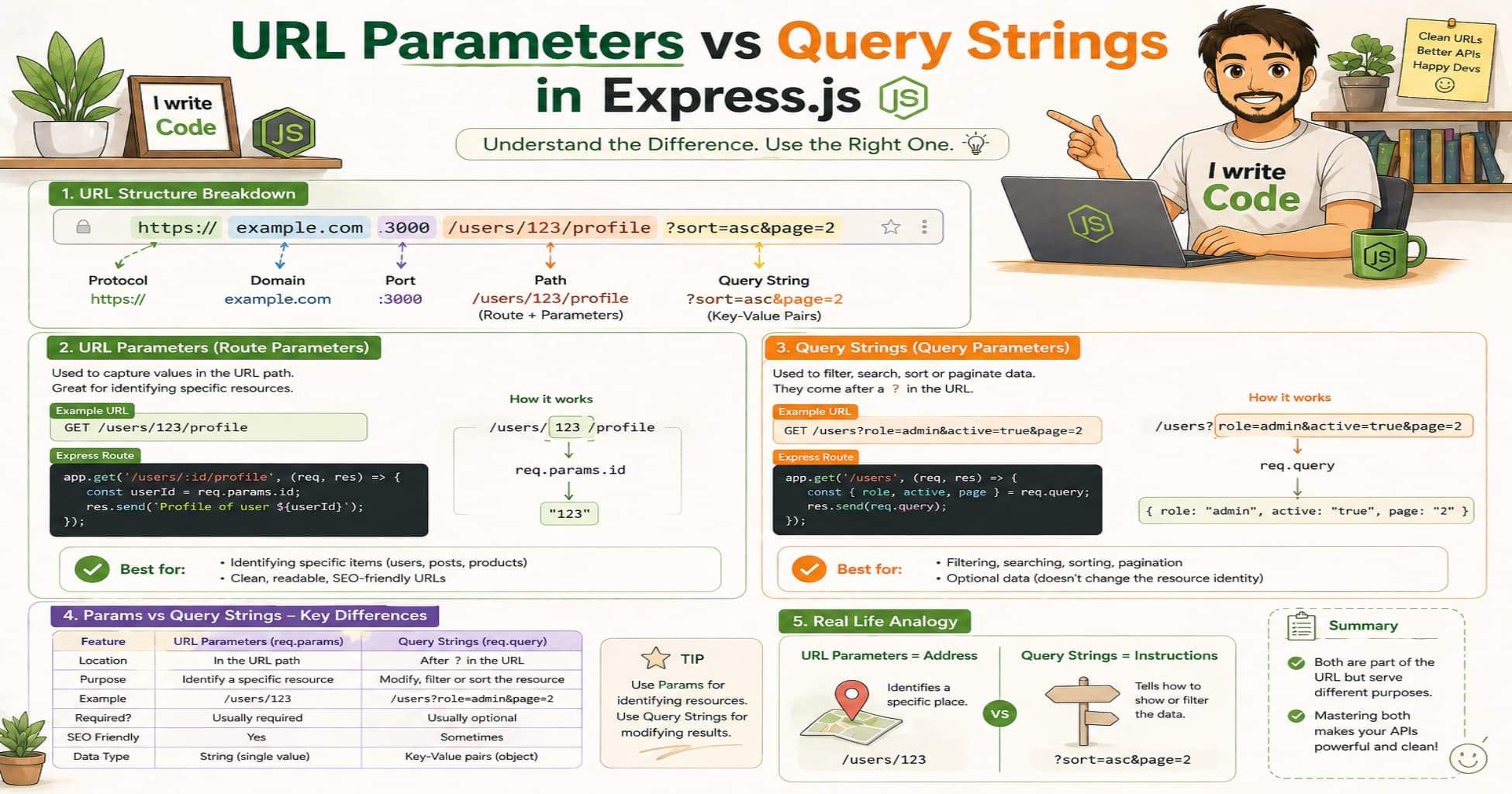
URL parameters (also called path parameters or route parameters) are dynamic segments embedded directly into the URL path. They act as placeholders for specific values that your application needs to identify a resource.
For example:
/users/42
/posts/javascript-basics
/orders/ORD-9981/items
In these URLs, 42, javascript-basics, and ORD-9981 are URL parameters. They are required for the route to match and typically represent unique identifiers, slugs, or hierarchical relationships. Think of them as the exact "address" of a specific item in your system. If you remove or change a URL parameter, you’re requesting a completely different resource.
What Are Query Parameters?
Query parameters appear after the ? character in a URL and are formatted as key-value pairs. Multiple pairs are separated by &.
For example:
/products?category=electronics&sort=price&limit=10
/users?role=admin&active=true
/search?q=express+tutorial&page=2
Unlike URL parameters, query parameters are optional and do not change the base route. They are primarily used to modify how a resource is retrieved or displayed. Common use cases include filtering, sorting, pagination, search terms, and toggling view modes. The same endpoint can behave differently based on the query string attached to it, making query parameters highly flexible.
Key Differences Between URL and Query Parameters
| Feature | URL Parameters | Query Parameters |
|---|---|---|
| Location | Inside the path (/users/:id) |
After ? (/users?role=admin) |
| Syntax | Defined with : in route definitions |
Key-value pairs separated by & |
| Required? | Yes (route won’t match without them) | No (base route works fine without them) |
| Primary Purpose | Identify a specific resource | Filter, sort, paginate, or modify response |
| REST Convention | Used for resource hierarchy & IDs | Used for optional modifiers & search |
| Caching & SEO | Treated as unique URLs by browsers/CDNs | Often ignored or handled separately |
Understanding these differences helps you design routes that are intuitive, scalable, and aligned with industry standards.
Accessing Params in Express
Express makes working with URL parameters straightforward. You define them in your route path using a colon (:), and Express automatically extracts them into the req.params object.
const express = require('express');
const app = express();

// Define a route with a URL parameter
app.get('/users/:userId', (req, res) => {
  const userId = req.params.userId;

  // Mock database response
  const user = {
    id: userId,
    name: "Suprabhat",
    age: 23,
    role: "developer"
  };

  res.json(user);
});

app.listen(3000, () => console.log('Server running on port 3000'));
When a client requests /users/42, Express matches the route, extracts 42, and assigns it to req.params.userId. You can define multiple parameters in a single route (e.g., /posts/:postId/comments/:commentId), and Express will parse each one into the req.params object.
Note: URL parameters are always returned as strings. If you need numbers or booleans, you must explicitly convert them using parseInt(), Number(), or validation middleware.
Accessing Query Strings in Express
You don’t need to define query parameters in your route path. Express automatically parses everything after the ? and populates the req.query object.
app.get('/products', (req, res) => {
  const { category, sort, limit } = req.query;

  // Default values if query params are missing
  const safeLimit = limit ? parseInt(limit, 10) : 20;
  const safeSort = sort || 'createdAt';

  res.json({
    message: 'Fetching products',
    filters: { category, sort: safeSort, limit: safeLimit }
  });
});
A request to /products?category=books&sort=price&limit=5 will result in:
req.query = {
  category: 'books',
  sort: 'price',
  limit: '5'
}
Express uses the qs library under the hood, which also supports nested objects and arrays (e.g., ?tags=node&tags=express becomes { tags: ['node', 'express'] }). Like URL params, query values are always strings, so type conversion or validation is recommended before using them in database queries or business logic.
When to Use Params vs Query
Choosing between URL parameters and query parameters isn’t just a stylistic preference. It impacts API design, caching, SEO, and developer experience. Follow these practical guidelines:
Use URL Parameters When:
You’re identifying a specific resource (
/users/123,/orders/ORD-55)The value is required for the route to make sense
You’re building RESTful endpoints that follow resource hierarchy
You want clean, bookmarkable URLs for individual items
The parameter represents a primary key, slug, or unique identifier
Use Query Parameters When:
You’re filtering, sorting, or paginating a collection (
?status=active&page=2)The data is optional or has sensible defaults
You’re handling search terms (
?q=express+routing)You need to pass multiple modifiers without creating endless route combinations
You want to keep your route structure flat and maintainable
Common Mistakes to Avoid:
Putting optional filters in the path (
/users/active/sorted-by-name) → Use query params instead.Using query params for required resource IDs (
/users?id=42) → Breaks REST conventions and hurts caching.Mixing both for the same purpose → Confuses API consumers and complicates documentation.
A good rule of thumb: Path params answer "which one?", query params answer "how should I show it?"
Conclusion
URL parameters and query parameters serve different but complementary roles in web development. URL parameters lock down the identity of a resource, while query parameters give you the flexibility to shape how that resource is delivered. Express handles both elegantly through req.params and req.query, allowing you to build clean, predictable routes without boilerplate parsing logic.
As you design your endpoints, remember to align your choices with REST principles, keep required identifiers in the path, and reserve the query string for optional modifiers. Validate and sanitize all incoming values, convert types explicitly, and document your expected parameters clearly.
With this foundation, you’ll craft APIs that are intuitive for frontend developers, cache-friendly for CDNs, and scalable as your application grows. Spin up an Express server, experiment with different route combinations, and watch how cleanly your app can handle dynamic requests. Happy routing!