What is Node.js? JavaScript on the Server Explained
If you started learning web development a decade ago, you were probably told one golden rule: JavaScript lives in the browser. It was the language of button clicks, form validations, and animated dropdowns. Servers? Those belonged to PHP, Python, Java, or Ruby.
Then came Node.js, and everything changed.
Today, JavaScript powers everything from frontend interfaces to backend APIs, real-time chat apps, and even command-line tools. But how did a browser scripting language suddenly run on servers? What makes Node.js different? And why do companies like Netflix, Uber, and LinkedIn rely on it?
In this beginner-friendly guide, we’ll break down exactly what Node.js is, why JavaScript was originally trapped in the browser, how Node.js set it free, and the core ideas that make it so powerful.
What Exactly is Node.js?
Let’s clear up a common misconception right away: Node.js is not a programming language, and it’s not a framework.
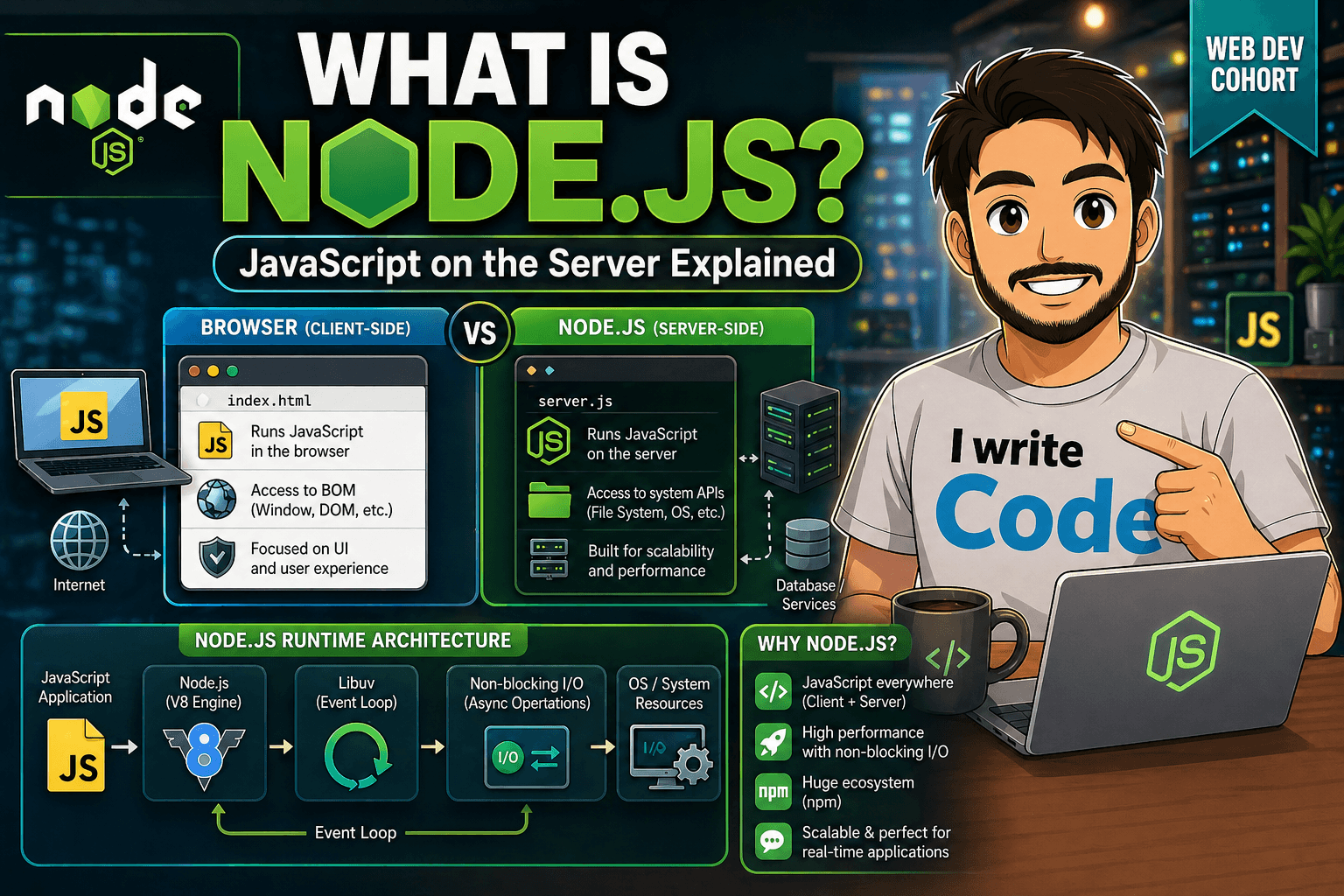
Node.js is a runtime environment. In simple terms, it’s a platform that allows JavaScript code to run outside of a web browser. It provides the necessary tools, libraries, and system access so JavaScript can interact with your computer’s operating system, read files, open network ports, and handle server requests.
Think of it like an engine stand. JavaScript is the engine, and Node.js is the stand that lets you run that engine in a garage instead of inside a car.
Why JavaScript Was Originally Browser-Only
JavaScript was created in 1995 by Brendan Eich at Netscape with a very specific goal: make web pages interactive. It was designed to run inside browsers, and for security reasons, browsers intentionally sandboxed it.
This sandbox meant JavaScript could:
Manipulate HTML and CSS
Respond to user clicks and keyboard input
Make limited network requests (later via AJAX)
But it could not:
Read or write files on your computer
Open raw network sockets
Access system processes or hardware
Run independently without a browser tab open
These restrictions were necessary. Imagine if any website you visited could silently read your documents or execute system commands. The browser sandbox kept users safe, but it also locked JavaScript into the client side.
How Node.js Made JavaScript Run on Servers
In 2009, a developer named Ryan Dahl asked a simple but revolutionary question: What if we took JavaScript out of the browser and gave it access to the system?
He didn’t rewrite JavaScript. Instead, he took Google’s V8 JavaScript engine (the same one powering Chrome), extracted it from the browser, and wrapped it with C++ bindings. These bindings acted as a bridge, exposing operating-system-level features like:
File system access (
fsmodule)Networking and HTTP servers (
net,httpmodules)Process management and environment variables
Cryptography and streams
Suddenly, JavaScript wasn’t just manipulating DOM elements anymore. It could listen on port 3000, read a database, serve JSON, and handle thousands of concurrent requests. Node.js was born, and JavaScript became a full-stack language.
The V8 Engine: A High-Level Overview
You’ll often hear that Node.js is “fast,” and much of that credit goes to the V8 engine.
V8 is an open-source JavaScript engine written in C++ and developed by Google. Traditionally, scripting languages were interpreted line-by-line, which made them slow. V8 changed that by using Just-In-Time (JIT) compilation. Instead of reading JavaScript slowly during execution, V8 compiles it directly into optimized machine code that your CPU can run natively.
At a high level, V8:
Parses your JavaScript code
Compiles it into fast machine code before/during execution
Optimizes hot code paths automatically
Handles memory management and garbage collection
Node.js simply leverages V8’s speed and pairs it with system-level APIs. You write JavaScript, V8 makes it run fast, and Node.js gives it server capabilities.
Event-Driven Architecture & Non-Blocking I/O
If V8 is the muscle, event-driven architecture is the nervous system of Node.js. This is where beginners often get confused, so let’s simplify it.
Traditional server languages often use a thread-per-request model. If 100 users make a request, the server spins up 100 threads. If one request waits for a database query, that thread sits idle, wasting memory and CPU.
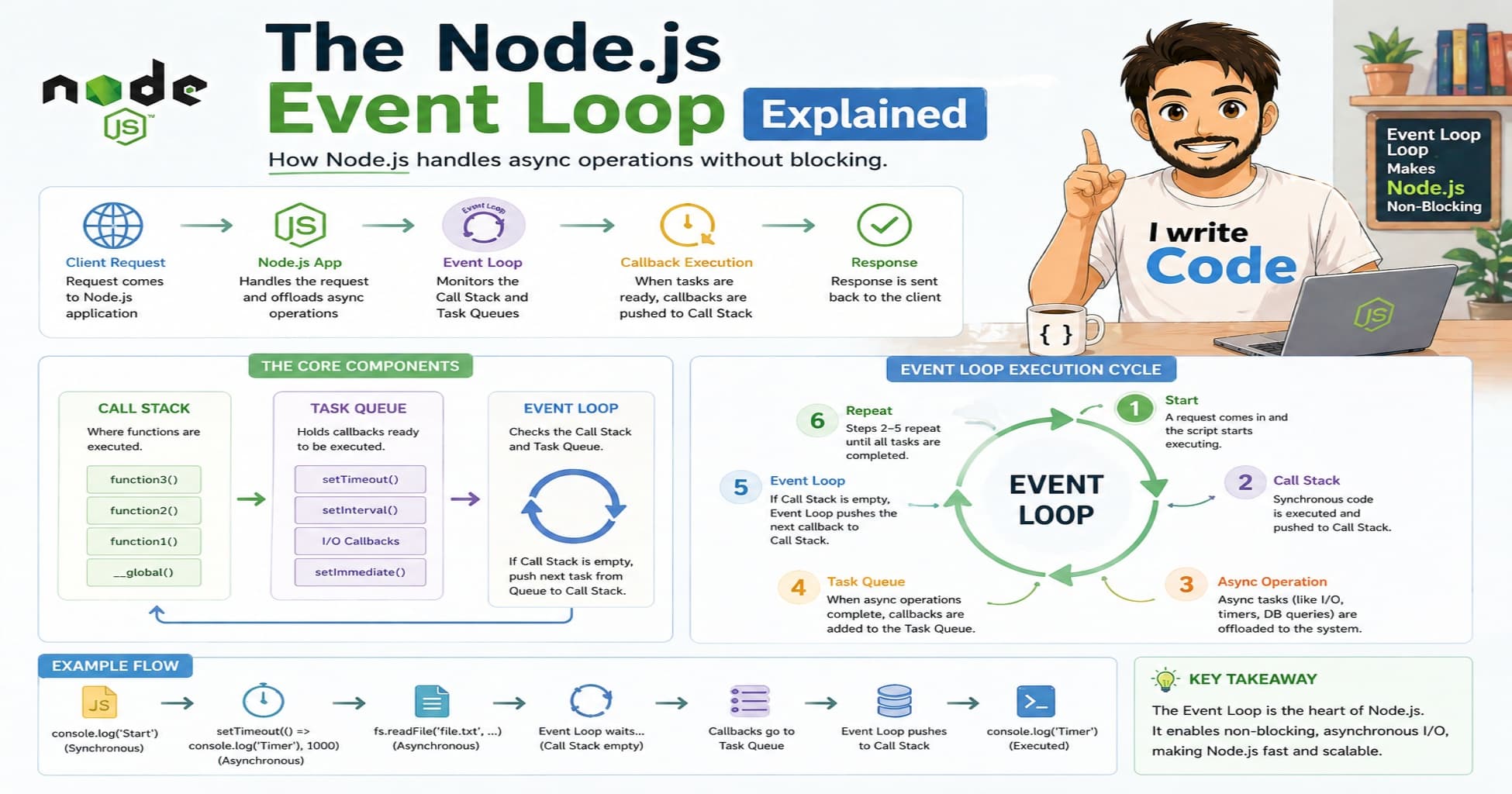
Node.js works differently. It runs on a single thread but uses an event loop to handle tasks asynchronously. Here’s a real-world analogy:
Imagine a restaurant with one highly efficient waiter (the event loop). Instead of standing in the kitchen waiting for each dish to cook (blocking), the waiter takes an order, sends it to the kitchen, and immediately goes to serve other tables. When the food is ready, the kitchen rings a bell (an event), and the waiter delivers it. No waiting. No idle time.
In technical terms:
I/O operations (database calls, file reads, network requests) are handed off to the system
Node.js continues executing other code
When the operation finishes, a callback or promise resolves, and the event loop picks it up
This is called non-blocking I/O
This architecture allows Node.js to handle tens of thousands of concurrent connections with minimal overhead, making it incredibly efficient for I/O-heavy workloads.
Real-World Use Cases of Node.js
Node.js isn’t a magic bullet for every problem, but it shines in specific scenarios. Here’s where it’s commonly used in production:
1. Real-Time Applications
Chat apps, live dashboards, collaborative editors (like Google Docs), and multiplayer games benefit from Node’s event-driven model. Technologies like WebSockets integrate seamlessly, enabling instant two-way communication.
2. RESTful APIs & Microservices
Because JavaScript natively handles JSON, Node.js is a natural fit for building lightweight, fast APIs. Frameworks like Express.js make routing, middleware, and request handling straightforward. Many companies split monolithic apps into Node-powered microservices.
3. Streaming Applications
Node.js handles data streams efficiently. Instead of loading an entire file into memory, it processes data in chunks. This makes it ideal for video/audio streaming, large file uploads, and real-time data pipelines.
4. Developer Tools & CLI Utilities
The npm (Node Package Manager) ecosystem hosts over a million packages. Tools like Webpack, ESLint, Vite, and countless CLI utilities are built with Node.js because it’s cross-platform, fast, and easy to distribute.
5. Server-Side Rendering (SSR) & Full-Stack Frameworks
Modern frameworks like Next.js, Nuxt, and Remix use Node.js to render React/Vue components on the server, improving SEO and initial load performance before hydrating on the client.
Where Node.js Isn’t Ideal
It’s worth noting that Node.js struggles with CPU-intensive tasks like video encoding, image processing, or complex mathematical computations. Since it runs on a single thread, heavy CPU work can block the event loop. For those cases, languages like Python, Go, or Rust, or offloading to worker threads, are better choices.
Conclusion
Node.js didn’t just change where JavaScript could run; it changed how developers think about building web applications. By extracting the V8 engine from the browser, bridging it to system APIs, and embracing an event-driven, non-blocking architecture, Node.js turned a client-side scripting language into a server-side powerhouse.
If you’re just starting out, don’t worry about mastering every concept at once. Begin by running a simple node app.js, create a basic HTTP server, and watch how JavaScript behaves outside the browser. The more you experiment, the clearer the event loop, modules, and async patterns will become.
JavaScript was once confined to making buttons click. Today, thanks to Node.js, it powers APIs, real-time systems, and full-stack applications across the globe. And the best part? You already know the language. You just need the runtime.