Blocking vs Non-Blocking Code in Node.js

Across the Internet, every modern web application handles hundreds or thousands of requests at the same time. But behind the scenes, Node.js runs on a single thread. If one task takes too long, everything else stops. This is where the difference between blocking and non-blocking code becomes critical. In this blog we will understand what is blocking and non-blocking code, how they affect the Event Loop, see practical examples with file and database operations, and how this connects to real Node.js applications.
First, let’s understand what is blocking code and why it matters.
What is blocking code and why it matters
Blocking code runs synchronously. This means the program stops and waits for an operation to finish before moving to the next line. If a task takes five seconds to complete, the entire JavaScript thread pauses for five seconds.
In Node.js, this is dangerous because there is only one main thread. When the thread is blocked, the Event Loop cannot pick up new requests, process timers, or handle any other callbacks. The server appears frozen to all users until the blocking task finishes.
Common examples of blocking code include:
fs.readFileSync()for file operationscrypto.pbkdf2Sync()for password hashingHeavy
fororwhileloops with complex calculationsSynchronous database queries in older drivers
While blocking code is simple to read and debug, it does not scale. A single slow file read or a complex math operation can delay hundreds of other requests waiting in line. Beginners often use blocking methods because they look straightforward, but in production servers, they become performance bottlenecks.
What is non-blocking code and how it works
Non-blocking code runs asynchronously. Instead of waiting for a task to finish, Node.js hands the operation to Libuv in the background and immediately continues executing the next lines of code.
When the background task completes, the result is placed in the Callback Queue. The Event Loop later picks it up and runs the callback or resolves the promise. This keeps the main thread free to handle other incoming requests.
Examples of non-blocking code include:
fs.readFile()with callbacks or promisesfetch()oraxiosfor HTTP requestsDatabase queries using
async/awaitsetTimeout()andsetInterval()for delayed execution
Non-blocking code does not mean the task finishes faster. It means the server does not waste time waiting. It can serve other users while the background work completes. This is why Node.js excels at I/O-heavy applications like APIs, real-time chats, and streaming services.
A common point of confusion is async/await. It looks synchronous when you read it, but it is completely non-blocking. The await keyword pauses only the current function, not the entire Event Loop. Other requests continue processing normally.
Step by step comparison with practical examples
Let’s compare both approaches using a simple file read operation.
Blocking version:
const fs = require('fs');
const data = fs.readFileSync('users.json', 'utf8');
console.log('File read finished');
console.log(data);
In this code, the program stops at readFileSync(). It waits until the entire file is loaded into memory. Only then does it print the logs. If another user sends a request during this wait, the server ignores it until the file read completes.
Non-blocking version:
const fs = require('fs').promises;
fs.readFile('users.json', 'utf8')
  .then(data => console.log(data))
  .catch(err => console.error(err));
console.log('File read started');
Here, readFile() starts the operation and immediately moves to the next line. The console prints "File read started" right away. When the file finishes loading in the background, the .then() callback runs. The Event Loop stays free to process other tasks in the meantime.
The same principle applies to database calls, API requests, and network operations. Non-blocking code keeps the application responsive under load.
How blocking and non-blocking code affect the Event Loop
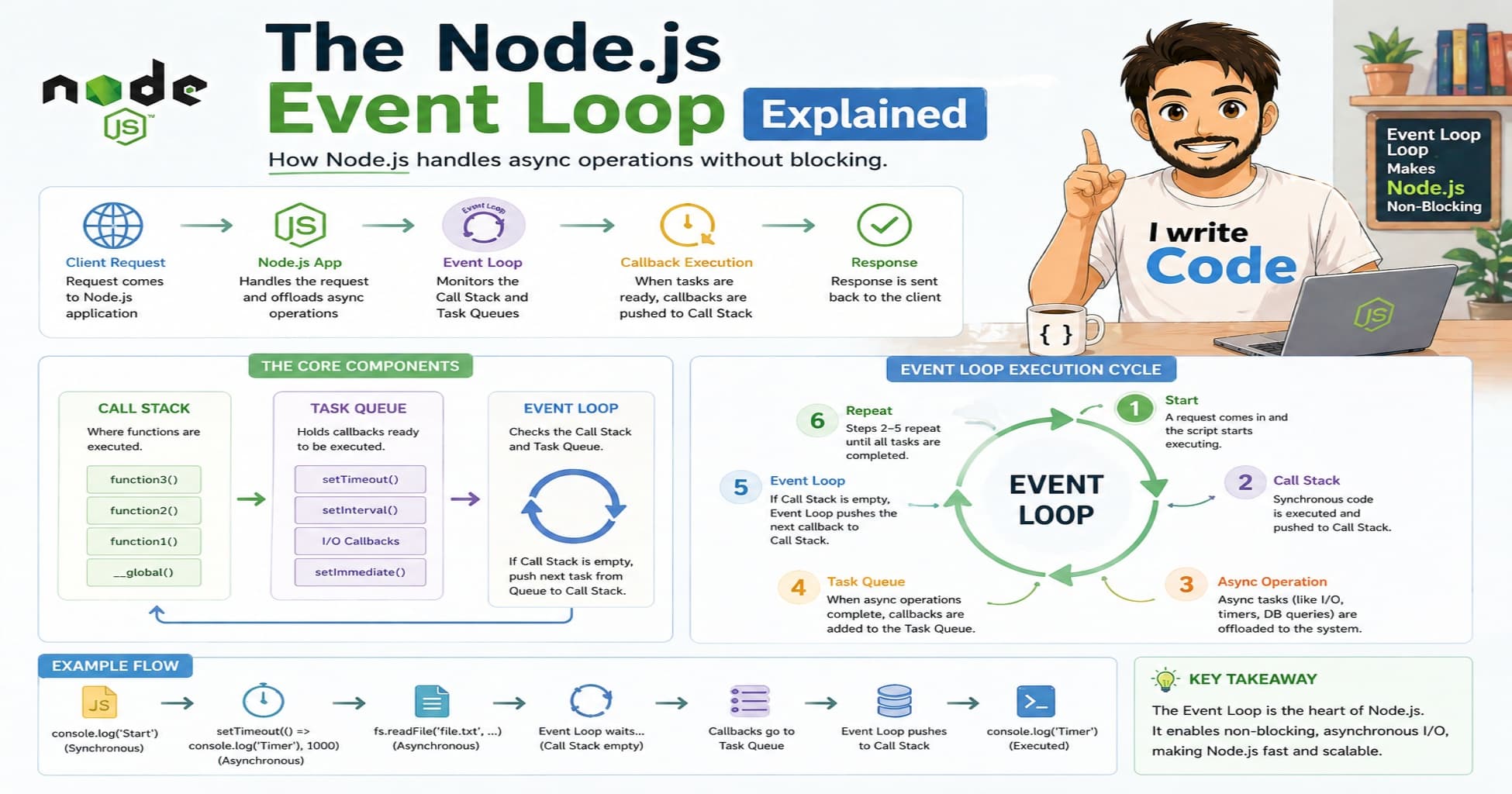
The Event Loop is designed to stay fast and continuous. It constantly checks the Call Stack, moves tasks from the Callback Queue, and runs them one by one.
When you use blocking code, you freeze the Call Stack. The Event Loop cannot move to the next phase. Timers delay, pending callbacks stack up, and new requests queue indefinitely. The poll phase stops waiting for I/O because the thread is busy running synchronous code. Even setTimeout callbacks will not fire until the blocking operation finishes.
When you use non-blocking code, the Event Loop flows smoothly. I/O tasks go to Libuv, the main thread stays empty, and the loop continues cycling through phases. Completed tasks enter the queue and get executed without interrupting other operations. The poll phase efficiently waits for I/O events and immediately processes them when ready.
This is why writing non-blocking code is not just a best practice in Node.js. It is a requirement for performance.
Common mistakes beginners make
Many developers new to Node.js accidentally block the Event Loop without realizing it. Here are the most frequent pitfalls:
Using sync methods in route handlers:
fs.readFileSync()inside an Express route will freeze that route for every user.Heavy JSON parsing:
JSON.parse()on a massive payload runs on the main thread and blocks other requests.Complex loops: Nested
forloops with thousands of iterations consume CPU and stop the loop from checking the queue.Ignoring promise rejections: Unhandled promise rejections do not block the loop immediately, but they cause memory leaks and eventual crashes.
To avoid these, always profile your code, use streaming for large files, and move CPU-heavy work outside the main thread.
When to use blocking vs non-blocking code
Choosing the right approach depends on your use case.
Use non-blocking code for:
File reads and writes in web servers
Database queries and API calls
Network requests and WebSocket messages
Any I/O operation that involves waiting for external systems
Use blocking code only for:
Simple scripts or CLI tools where performance does not matter
Application startup tasks that must finish before the server begins listening
Configuration file reads that happen once during initialization
If you must run heavy CPU tasks like image processing, video encoding, or complex data analysis, do not block the main thread. Instead, use Worker Threads or Child Processes. These run in separate threads and communicate with the main process without freezing the Event Loop.
Connecting blocking vs non-blocking to real user requests
When a user interacts with your application, the difference becomes obvious.
Let’s imagine a user named: "Suprabhat", age: 23, tries to log into a web application. The server needs to read his profile data from a JSON file and verify his password.
If the server uses blocking code: Suprabhat clicks login. The server calls readFileSync() and hashSync(). The entire thread pauses. If another user tries to register at the same time, their request waits. Suprabhat’s page hangs until both operations finish. Under heavy traffic, the server times out and returns 503 errors.
If the server uses non-blocking code: Suprabhat clicks login. The server hands the file read and password check to Libuv. The Event Loop continues handling other requests. When the background tasks finish, the results return to the queue. The Event Loop picks them up, formats the response, and sends it back. Suprabhat gets a fast response, and other users are not affected.
This shows how non-blocking code directly improves user experience and server stability.
Conclusion
Blocking code stops execution and waits. Non-blocking code continues running and handles results later. In a single-threaded environment like Node.js, this difference determines whether your application scales or crashes under load.
Always prefer non-blocking I/O for web servers. Use async/await or promises to keep code clean and readable. Reserve synchronous methods for startup scripts or local tools. For CPU-heavy work, move it to Worker Threads.
Understanding this flow gives a clear picture of how servers manage heavy traffic without freezing. Choosing the right execution model keeps the Event Loop free and ensures every request gets processed smoothly!