

The Node.js Event Loop Explained
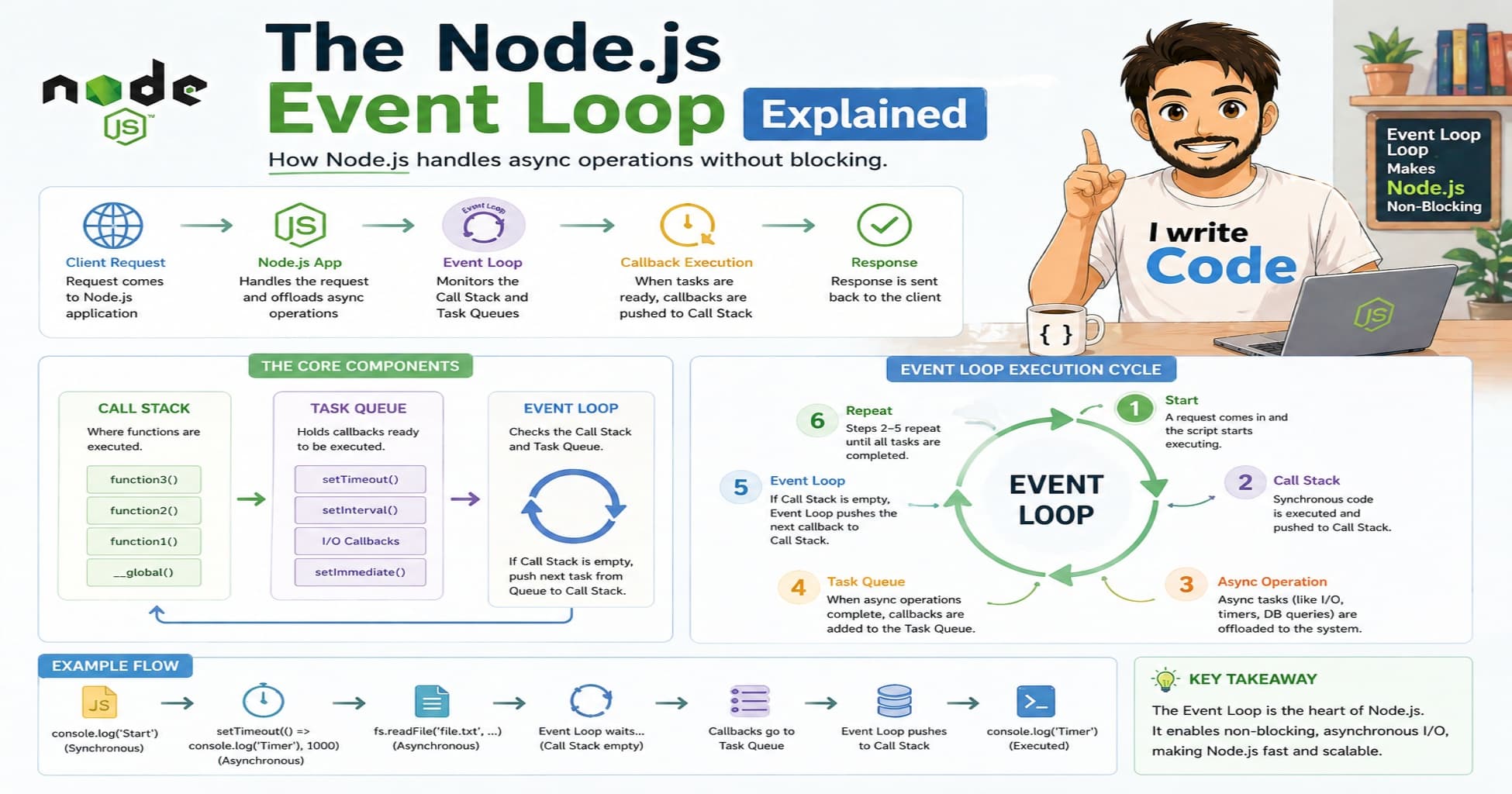
Across the Internet, every modern web application handles hundreds or thousands of requests at the same time. But behind the scenes, Node.js runs on a single thread. How does it manage heavy workloads without freezing or slowing down? In this blog we will understand what is the Event Loop and why it exists, how it works step by step using its different phases, and how this connects to real Node.js applications.
First, let’s understand what is the Event Loop and why it exists.
What is the Event Loop and why it exists
Node.js is single-threaded. This means it can only execute one piece of JavaScript code at a time. If Node.js had to wait for every database query, file read, or API call to finish before moving to the next line, it would become extremely slow and unresponsive.
To solve this, Node.js uses the Event Loop. It acts like a smart traffic manager that constantly checks if background tasks are finished. When a task completes, the Event Loop picks it up and hands it back to the main thread. This makes Node.js non-blocking and highly efficient for I/O-heavy operations.
Without the Event Loop, we would need multi-threading for every request, which consumes more memory and is harder to manage. The Event Loop gives us the speed of async programming with the simplicity of a single thread.
How the Event Loop works step by step
Before understanding the phases, we need to know the main components that work together behind the scenes.
The Call Stack runs JavaScript code line by line. It is where all your synchronous functions execute. When you call a function, it goes on top of the stack. When it returns, it gets removed.
When an async task like reading a file or making an HTTP request happens, it is handed off to Libuv. Libuv is a C library that handles system-level operations in the background. It manages thread pools, network sockets, and file system operations.
Once the background task finishes, the result is placed in the Callback Queue.
The Event Loop constantly checks one simple question: Is the Call Stack empty?
If yes, it takes the first task from the Callback Queue and pushes it onto the Call Stack. Then the main thread executes it. This cycle repeats endlessly, making Node.js fast and responsive.

Now let’s understand how the Event Loop moves through its different phases.
Understanding the different phases of the Event Loop
The Event Loop does not just pick tasks randomly. It moves through specific phases in a strict order. Each phase has its own purpose and runs callbacks accordingly.
Timers Phase This phase runs callbacks scheduled by setTimeout and setInterval. If you set a timeout for 2000 milliseconds, the Event Loop checks if enough time has passed and executes the callback in this phase.
Pending Callbacks Phase This phase handles certain system operations that could not run in the previous phase. It mainly deals with TCP error messages or network events that need immediate attention.
Poll Phase This is the most important phase. It waits for new I/O events to complete, like reading a file, receiving a database response, or handling incoming requests. If the Callback Queue is empty, the Event Loop will actually pause here until new tasks arrive. This prevents the loop from wasting CPU cycles.
Check Phase This phase runs setImmediate() callbacks. It is used when you want to execute code right after the poll phase completes, without waiting for timers.
Close Callbacks Phase This phase handles cleanup operations. It runs callbacks for closed connections, like socket.on('close') or file stream closures.
After the close phase, the loop checks if there are any active handles or pending requests. If yes, it starts over from the timers phase. If not, the Node.js process exits gracefully.

Understanding process.nextTick and setImmediate
Developers often confuse process.nextTick() and setImmediate(). They look similar but work differently.
process.nextTick() is not part of the Event Loop phases. It runs immediately after the current operation finishes, before the loop moves to the next phase.
setImmediate() runs inside the check phase of the Event Loop.
This means process.nextTick() has higher priority. If you mix both in your code, nextTick callbacks will always run first. This is useful for breaking up long-running tasks or deferring work to the next iteration without leaving the current call context.
How to avoid blocking the Event Loop
Since Node.js runs on a single thread, blocking the Event Loop can freeze your entire application. Heavy synchronous operations like large JSON parsing, complex math calculations, or synchronous file reads will stop the loop from processing other requests.
When to use what:
Use async/await or Promises for database calls, file operations, and API requests.
Avoid
syncmethods likefs.readFileSyncin production servers.Use worker threads or child processes for CPU-heavy tasks like image processing or data encryption.
This keeps the Event Loop free to handle incoming traffic while heavy work runs in parallel.
Connecting the Event Loop to real Node.js requests
When a user sends a request to your Node.js server, the same Event Loop process happens behind the scenes.
Browser → Sends HTTP request Server → Receives request and places it in the queue Event Loop → Picks up the request and passes I/O work to Libuv Libuv → Handles database query or file read in background Poll Phase → Waits for the database to respond Check Phase → Executes response formatting Server → Sends data back to the browser
Let’s imagine a user named: "Suprabhat", age: 23, logs into a web app. When he clicks login, the server does not stop to wait for the database. It hands the query to Libuv, continues handling other requests, and only returns to format Suprabhat’s profile data once the database replies. This keeps the app fast even under heavy traffic.
So every web request depends on the Event Loop before any response is sent back.

Conclusion
The Event Loop is the hidden engine that makes Node.js fast and scalable. It handles async work smartly by moving heavy tasks to background threads and checking back only when needed. Understanding this flow gives a clear picture of how servers manage heavy traffic without blocking or crashing.
Choosing the right async method depends on what you need. If you need something to run immediately after the current task, use process.nextTick(). If you want to run code in the next loop iteration, use setImmediate(). Understanding these phases helps you see how the "invisible" parts of Node.js work every time your server handles a request!



