Creating Routes and Handling Requests with Express
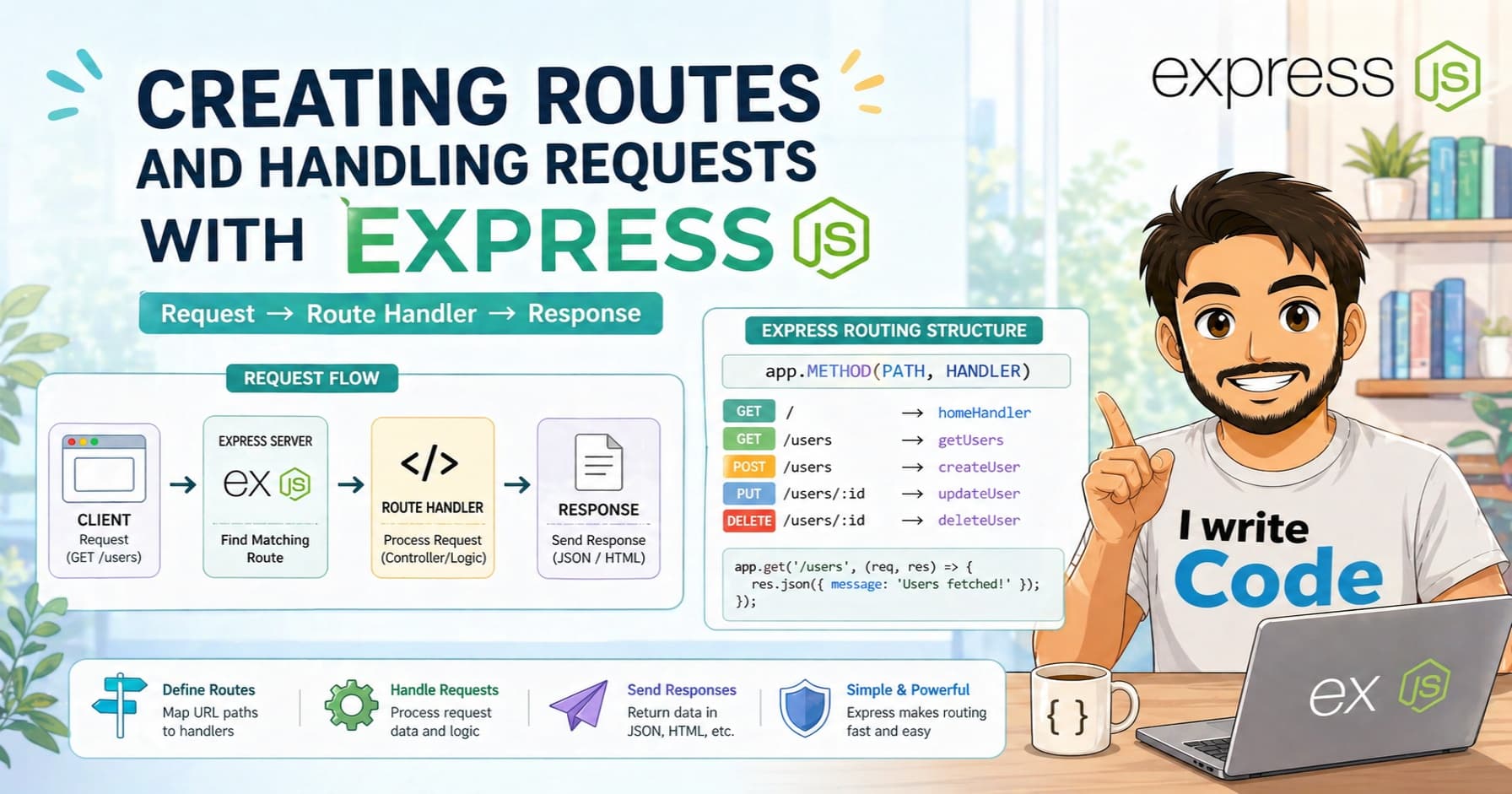
Across the web, every application you interact with relies on servers receiving requests and sending back responses. But writing raw Node.js servers can feel repetitive, verbose, and difficult to manage. To make this easier, developers use a framework called Express.js.
In this blog, we will understand what Express.js is, why it simplifies Node.js development, how to create your first Express server, how to handle GET and POST requests, how to send responses, and how this connects to real browser and API calls.
First, let’s understand what Express.js is and why it exists.
What Express.js is
Express.js is a lightweight, fast, and flexible web framework built on top of Node.js. Think of it as a toolkit that gives you ready-made methods to handle routes, parse requests, and format responses. Instead of writing long, manual code to check URLs, handle HTTP methods, or set headers, Express gives you simple functions like app.get() and app.post().
Express does not replace Node.js. It simply wraps around it and removes the boilerplate. It is unopinionated, meaning it does not force you into a specific project structure or database. You decide how to build your application, and Express provides the routing and middleware foundation to make it work smoothly.
Why Express simplifies Node.js development
When you use raw Node.js to create a server, you have to manually parse request URLs, check HTTP methods, handle query strings, read request bodies, and set response headers. This takes a lot of repetitive code and is prone to errors.
Express removes that friction. It provides:
Clean, readable routing (
/home,/api/users,/login, etc.)Built-in middleware support for parsing JSON, handling cookies, and logging requests
Simple syntax for handling different HTTP methods
Easy error handling and response formatting
Seamless integration with template engines and static files
Because of this, developers can focus on building features instead of managing low-level server logic. Express is the bridge between raw Node.js and production-ready web applications.
Creating your first Express server
Let’s start by setting up a basic Express server. First, make sure you have Node.js installed. Then, create a new folder, open your terminal, and run:
npm init -y
npm install express
Now, create a file called index.js and add the following code:
const express = require('express');
const app = express();
const PORT = 3000;

app.listen(PORT, () => {
  console.log(`Server is running on http://localhost:${PORT}`);
});
This code does three simple things:
Imports the Express module
Creates an application instance
Starts listening on port 3000
When you run node index.js, your server is live. But right now, it does not respond to any requests. If you visit http://localhost:3000 in your browser, you will see a loading state or a "Cannot GET /" error. Let’s fix that by adding routes.
Handling GET requests
GET requests are used when a client wants to retrieve data from the server. In Express, handling a GET request is straightforward. Add this to your index.js file:
app.get('/', (req, res) => {
  res.send('Welcome to the home page!');
});

app.get('/user', (req, res) => {
  res.send('User profile page');
});
Here’s what happens behind the scenes:
app.get()tells Express to listen for GET requests on a specific pathThe first argument is the route (
/or/user)The second argument is a callback function with
req(request) andres(response)When you visit the route in your browser, Express matches the path and sends back the response
GET requests are safe and idempotent. They should only fetch data, not modify anything on the server. Browsers also cache GET requests, which makes them fast for repeated visits.
Handling POST requests
POST requests are used when a client wants to send data to the server, like submitting a form, creating a new account, or uploading information. Unlike GET, POST requests carry a body. To read that body, Express needs a little help. Add this line before your routes:
app.use(express.json());
Now, create a POST route:
app.post('/user', (req, res) => {
  const userData = req.body;
  console.log('Received data:', userData);
  res.send('User created successfully');
});
How this works:
express.json()is middleware that parses incoming JSON data and attaches it toreq.bodyreq.bodycontains the data sent by the clientThe server logs the data and sends a confirmation response
You can test this using tools like Postman or curl:
curl -X POST http://localhost:3000/user -H "Content-Type: application/json" -d '{"name": "Suprabhat", "age": 23}'
POST requests are meant for creating or updating resources. They are not cached by browsers and can carry large payloads. Without the JSON middleware, req.body would be undefined, and your server would not be able to read the incoming data.

Sending responses
Express gives you multiple ways to send responses back to the client. The method you choose depends on what kind of data you are returning and how the frontend expects to receive it.
The most common response methods are:
res.send(): Sends plain text, HTML, or buffersres.json(): Sends JSON data and automatically sets the correctContent-Typeheaderres.status(): Sets HTTP status codes before sending a responseres.sendFile(): Sends static files like images, PDFs, or documents
Here’s a practical example combining status codes and JSON:
app.get('/api/info', (req, res) => {
  res.status(200).json({
    message: 'Success',
    data: { name: 'Suprabhat', age: 23, role: 'Developer' }
  });
});
Why response methods matter:
They tell the client what happened (success, error, not found, unauthorized)
They format data correctly so the frontend or API consumer can read it
They control headers, status codes, and content types
They prevent broken connections and timeout errors
Without proper responses, the client would not know if a request succeeded or failed. Status codes like 200 (OK), 201 (Created), 400 (Bad Request), and 404 (Not Found) are the universal language of web communication.

Connecting Express routes to real browser and API requests
When you type a URL in your browser, click a button in a web app, or call an API from a frontend framework, the same routing process happens.
Browser/API → Sends HTTP request → Express matches route → Runs callback → Sends response → Client receives data
Every web interaction depends on this request-response cycle. Express simply makes it predictable, readable, and easy to manage. Whether you are building a simple portfolio site, a REST API, or a full-stack application, routing is the backbone that connects users to your server logic.
Conclusion
Express.js is the missing piece that turns raw Node.js into a powerful, developer-friendly web framework. By simplifying routing, handling GET and POST requests cleanly, and providing flexible response methods, Express lets you build servers faster and with less code.
Understanding how routes work gives you a clear picture of how web applications communicate, how data flows between clients and servers, and how modern APIs are structured. Once you master these basics, you are ready to add middleware, connect databases, handle authentication, and build production-ready applications.