
Synchronous vs Asynchronous JavaScript
Across the Internet, millions of users are clicking buttons, loading videos, and sending messages all at the same time. If you’ve ever used a website where the screen "froze" while a photo was uploading, you’ve experienced the frustration of poorly managed code. To build smooth, professional apps, you must understand the heartbeat of JavaScript: the difference between Synchronous and Asynchronous execution.
In this deep-dive guide, we will explore why JavaScript is called "single-threaded," the difference between blocking and non-blocking code, how the Event Loop manages tasks behind the scenes, and when to use each approach in your projects.
The Restaurant Analogy: Sync vs. Async
Before we look at code, let’s go to a restaurant. This is the easiest way to understand the concept.
The Synchronous Restaurant (Blocking)
Imagine a small cafe with only one waiter.
A customer walks in and orders a complex steak.
The waiter takes the order to the kitchen and stands there waiting for the steak to cook.
While the steak is sizzling, a line of ten other customers forms at the door.
The waiter doesn't talk to them. He doesn't give them water. He just waits for that one steak.
Only after the steak is served does he take the next order.
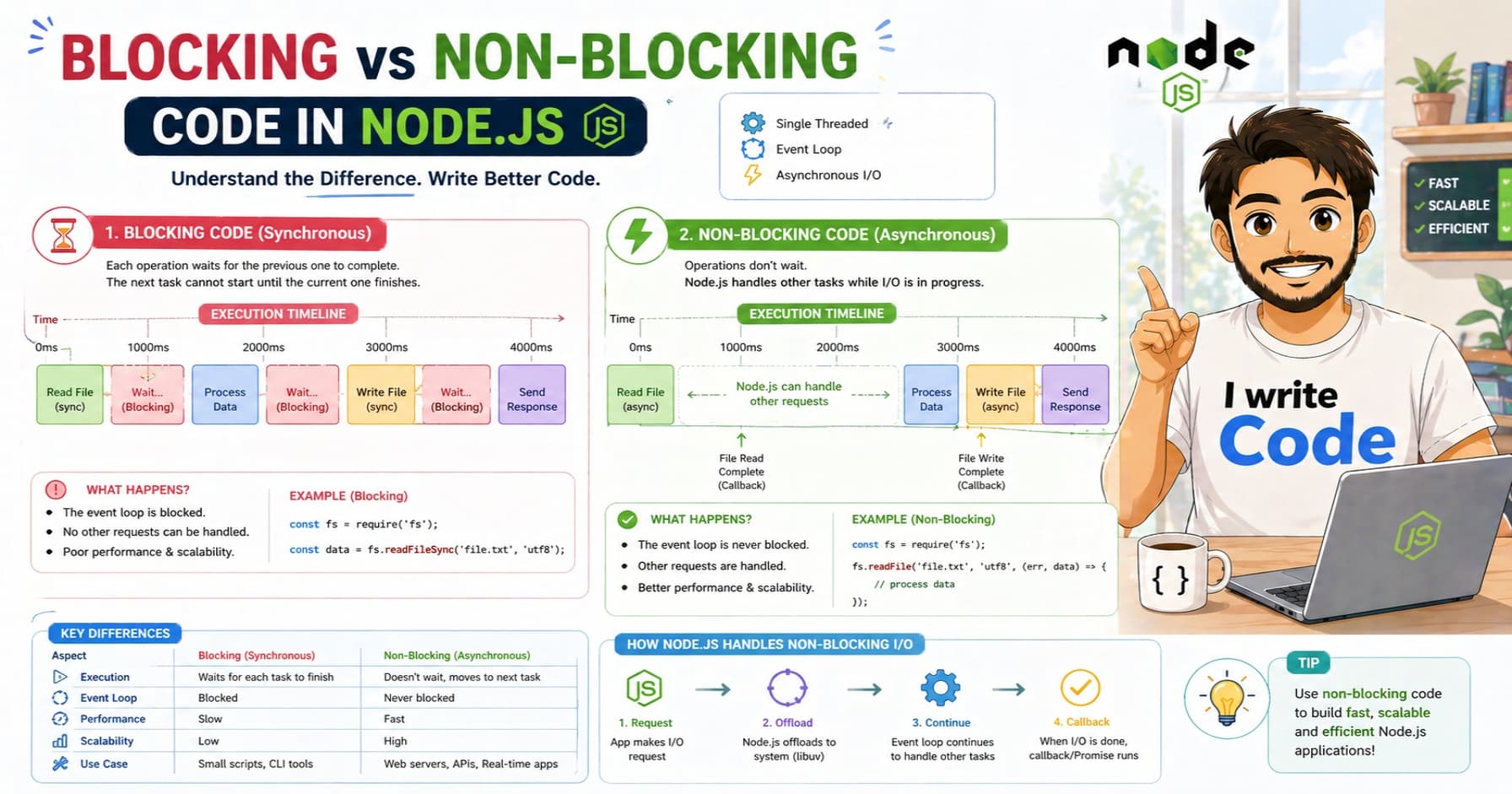
This is Synchronous behavior. It is "blocking" because one slow task stops everything else from happening.
The Asynchronous Restaurant (Non-blocking)
Now imagine a modern restaurant:
The waiter takes the steak order and hands it to the kitchen.
Instead of waiting, the waiter goes to the next table, pours water, and takes another order.
When the steak is finally ready, the kitchen rings a bell.
The waiter hears the bell, finishes what he is doing, and delivers the steak.
This is Asynchronous behavior. It is "non-blocking" because the waiter (the JavaScript thread) stays busy while the "cooking" (the heavy task) happens in the background.
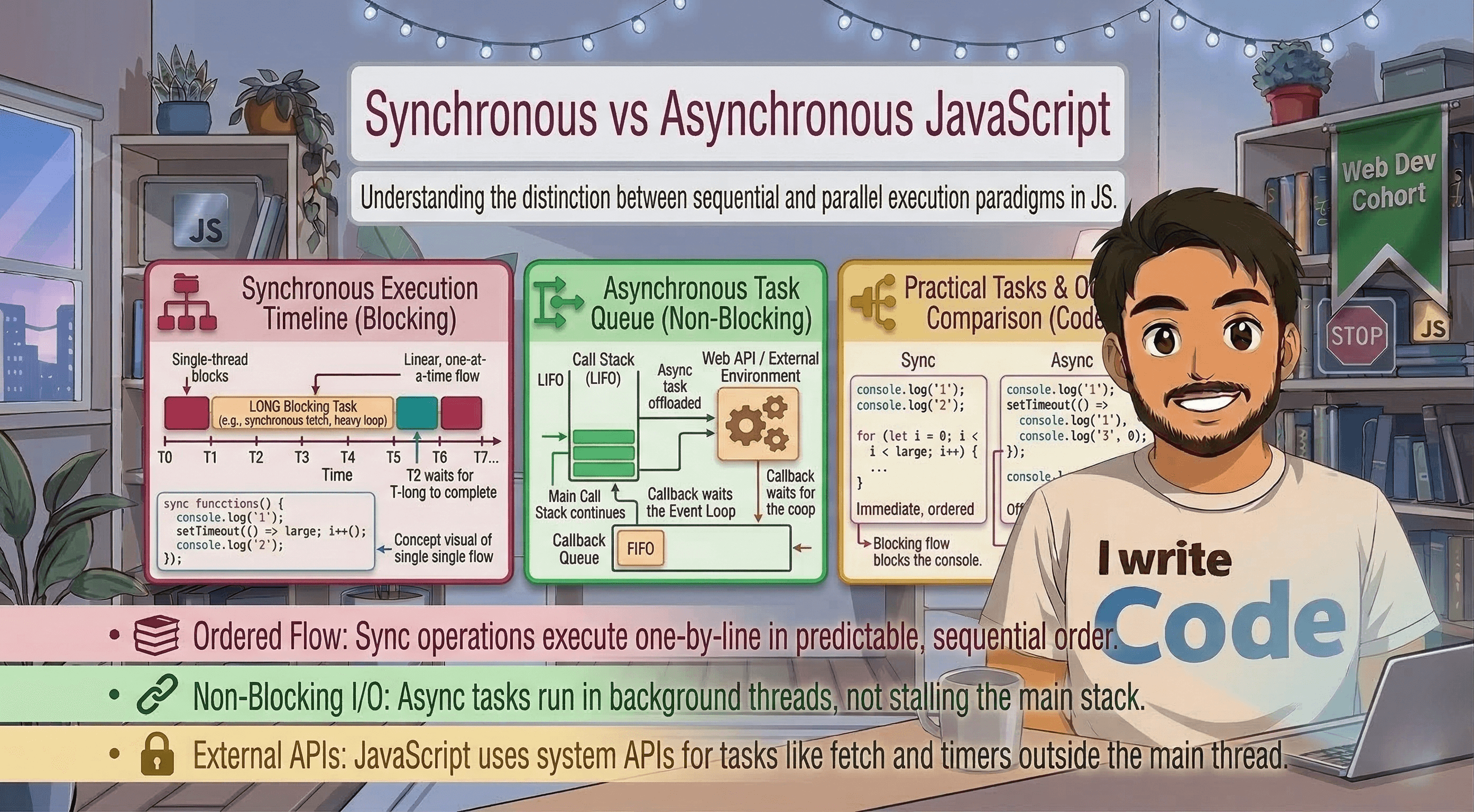
[Image comparing synchronous vs asynchronous execution flow in a diagram]
What is Synchronous JavaScript?
By default, JavaScript is Synchronous. It is also Single-threaded, meaning it can only do one thing at a time. It executes code line-by-line, from top to bottom.
How it works:
When a function is called, it is added to the Call Stack. JavaScript finishes that function completely before moving to the next line.
console.log("Step 1: Open the fridge");
console.log("Step 2: Take out the milk");
console.log("Step 3: Close the fridge");
In the example above, Step 2 must finish before Step 3 can even begin. This is fine for simple tasks like math or logging text. But what if Step 2 was "Wait 5 minutes for the milk to expire"? The entire program would stop for 5 minutes. This is called Blocking.
What is Asynchronous JavaScript?
Asynchronous JavaScript allows you to start a long-running task and move on to the next task immediately. When the long task is finished, the program is notified and handles the result.
Common asynchronous tasks include:
Fetching data from an API.
Talking to a database.
Setting timers (like
setTimeout).Reading a large file from a hard drive.
A simple Async example:
console.log("Start order");

setTimeout(() => {
    console.log("Pizza is ready!");
}, 3000); // Wait 3 seconds

console.log("Watch a movie while waiting");
The Output:
Start order
Watch a movie while waiting
(3 seconds pass...)
Pizza is ready!
Notice that "Watch a movie" happened before the pizza was ready. JavaScript didn't sit around waiting for the timer to end; it moved to the next line of code.
The Engine Under the Hood: The Event Loop
You might be wondering: "If JavaScript is single-threaded (one waiter), how can it do things in the background?"
The secret is that JavaScript isn't working alone. The browser (or Node.js) provides "Web APIs" that handle the heavy lifting. The process follows a specific cycle called the Event Loop.
The 4 Main Parts:
The Call Stack: Where your code is executed line-by-line.
Web APIs: The background environment where timers, network requests, and file reading happen.
The Task Queue: Where finished background tasks wait to be put back into the stack.
The Event Loop: The "traffic cop" that checks if the Call Stack is empty. If it is, it pushes the next task from the Queue into the Stack.
Things to remember: The Event Loop is the reason your browser doesn't crash when you're downloading a large file. The "waiting" happens in the Web API, leaving the Call Stack free to handle your mouse clicks and scrolling!
Blocking vs. Non-blocking Code
Understanding the difference between blocking and non-blocking is crucial for performance.
Blocking (The Bad Way)
If you run a heavy loop that takes 10 seconds to finish, the browser's UI will freeze. You can't click buttons, you can't highlight text, and the "loading" spinner will stop spinning.
// A heavy, blocking loop
console.log("Start");
for (let i = 0; i < 1000000000; i++) {
    // This takes time...
}
console.log("End"); // This won't run for a long time
Non-blocking (The Good Way)
By moving heavy logic into an asynchronous pattern (like using a Worker or breaking it into smaller chunks), you keep the main thread free.
Comparison Table: Sync vs. Async
| Feature | Synchronous (Sync) | Asynchronous (Async) |
|---|---|---|
| Execution | Line-by-line, one at a time. | Starts a task, moves to the next. |
| Blocking | Yes (one slow task blocks all). | No (background tasks don't block). |
| Predictability | Easy to follow and debug. | Can be harder to track (order changes). |
| Performance | Slower for I/O tasks (API, Files). | Much faster for I/O tasks. |
| User Experience | Can lead to "frozen" interfaces. | Keeps the UI responsive and smooth. |
When to Use Which?
You don't always want everything to be asynchronous.
Use Synchronous when:
You are doing simple math.
You are transforming a small amount of data.
The next line of code absolutely depends on the previous line (and both are fast).
Use Asynchronous when:
You are communicating with a server (API).
You are performing a task that takes more than a few milliseconds.
You are dealing with user-initiated events (like clicks or typing).
The Three Patterns of Async JavaScript
Over the years, JavaScript has evolved how we write async code. (We have covered these in detail in previous blogs, but here is the summary!)
Callbacks: The "Old Way." You pass a function into another function to be called later. (Can lead to "Callback Hell").
Promises: The "Better Way." An object that represents the eventual completion of a task.
Async/Await: The "Modern Way." Syntactic sugar that makes async code look synchronous and clean.
Conclusion
The choice between Synchronous and Asynchronous JavaScript is the choice between a frozen app and a fluid one. Synchronous code is straightforward but limited. Asynchronous code is powerful but requires a deeper understanding of the Event Loop.
As a developer, your goal is to keep the "Call Stack" clear so that your users never feel a "lag." By mastering the art of non-blocking code, you ensure that your applications stay fast, responsive, and professional.