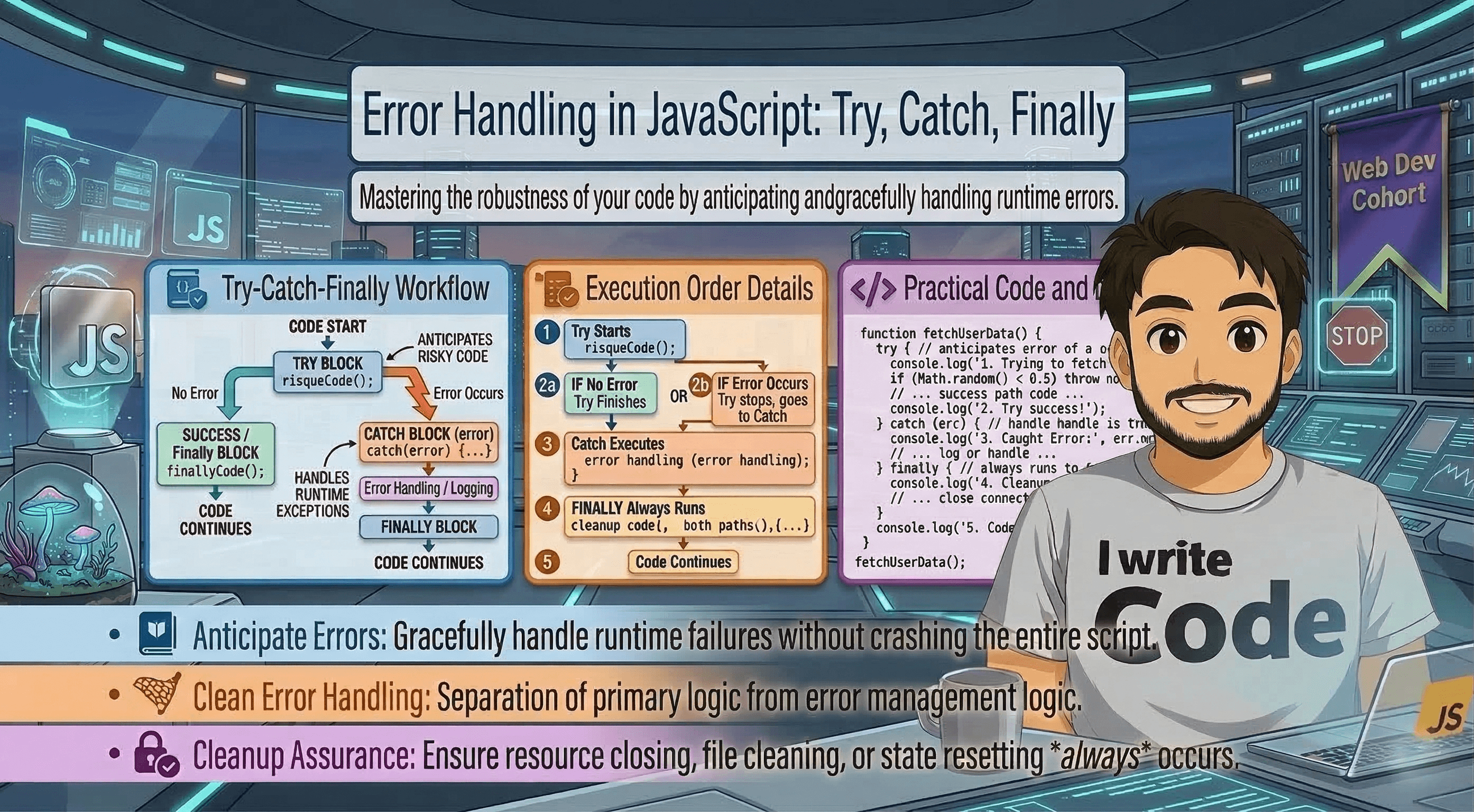
Error Handling in JavaScript: Try, Catch, Finally
Across the Internet, applications are constantly interacting with users, servers, and databases. But here is the truth: things go wrong. A user might type "ABC" into a "Phone Number" field, a server might go offline, or a file you’re trying to read might not exist. If your JavaScript code isn't prepared for these "surprises," the entire application will crash, leaving your users staring at a frozen screen.
In this deep-dive guide, we will understand how to handle these unexpected moments using Error Handling. We will explore the Try-Catch-Finally block, understand how to "throw" our own errors, look at the built-in Error Object, and see how to manage errors in real-world scenarios like API calls and data processing.
Why Do We Need Error Handling?
Imagine you are a pilot. Most of the time, the flight is smooth. But you are trained for emergencies, engine failure, storms, or technical glitches. You have a "manual" to follow when things go wrong so the plane doesn't crash.
In programming, Error Handling is that manual.
The Difference Between Errors and Bugs
Bugs: These are mistakes made by the developer (like a typo or logic error). You fix these during development.
Errors (Runtime Exceptions): These happen while the app is running. You can't always prevent them (like a slow internet connection), but you can "catch" them so the app continues to run gracefully.
Without error handling, a single error in one line of code stops the execution of the entire script. With error handling, you can say: "Try to do this task; if it fails, do this other thing instead, but keep the app alive."
The Core Structure: Try and Catch
The most basic way to handle errors in JavaScript is the try...catch statement. Think of it like a safety net for a trapeze artist.
1. The try Block
This is where you put the code that you think might fail. You are telling JavaScript: "Attempt to run this code, but keep an eye out for trouble."
2. The catch Block
If an error occurs inside the try block, JavaScript immediately stops running that code and "jumps" into the catch block. The catch block receives an Error Object that tells you exactly what went wrong.
try {
    // This code will run
    let result = 10 / someUndefinedVariable;
    console.log("This line will never run because the line above fails!");
} catch (error) {
    // This code runs only if an error happens
    console.log("Oops! We hit a snag.");
    console.log("Error Message: " + error.message);
}
The "Cleanup" Crew: The finally Block
Sometimes, you need certain code to run no matter what—whether the task succeeded or failed. This is what the finally block is for.
A common use case is "closing" something. If you open a file to read it, you must close it when you're done, even if the reading process fails. If you show a "Loading..." spinner on a website, you must hide it whether the data arrives successfully or the server returns an error.
try {
    console.log("Opening the database connection...");
    // Imagine some complex data operation here
} catch (error) {
    console.log("Error during operation: " + error.message);
} finally {
    console.log("Closing the database connection. This always runs!");
}
The "Finally" Gotcha
One interesting thing about finally is that it runs even if you use a return statement inside the try or catch blocks. It is the ultimate "cleanup" guarantee in JavaScript.
Understanding the Error Object
When an error happens, JavaScript doesn't just panic; it creates a detailed report called the Error Object. By default, this object has two main properties you should know:
name: The type of error (e.g.,ReferenceError,TypeError,SyntaxError).message: A human-readable description of what went wrong.stack: A "stack trace" showing exactly which line of code caused the error and which functions were called before it. (This is very helpful for developers during debugging).
try {
    decodeURIComponent('%'); // This causes a URIError
} catch (err) {
    console.log(err.name);    // URIError
    console.log(err.message); // URI malformed
}
Taking Control: The throw Keyword
Sometimes, an operation isn't technically "wrong" for JavaScript, but it is "wrong" for your business logic. For example, if a user tries to withdraw $500 but only has $100 in their bank account, that isn't a computer error, it's a logical one.
You can use the throw keyword to create your own custom errors. When you "throw" an error, it acts just like a built-in JavaScript error and will be caught by the nearest catch block.
function checkAge(age) {
    if (age < 18) {
        throw new Error("You must be 18 or older to access this site.");
    }
    return "Access granted!";
}

try {
    console.log(checkAge(15));
} catch (error) {
    console.error("Access Denied: " + error.message);
}
Things to remember: Always throw an
Errorobject (e.g.,throw new Error("Message")) rather than just a string (e.g.,throw "Error"). The Error object provides the stack trace, which makes your life much easier when debugging!
Real-World Scenarios for Error Handling
Let’s look at two very common places where try...catch is a lifesaver for web developers.
1. Parsing JSON Data
When you receive data from a server, it usually comes as a string in JSON format. You use JSON.parse() to turn it into an object. However, if the server sends "broken" JSON, your whole app will crash without error handling.
let jsonFromServer = '{"name": "Blog Buddy", "role": "Expert"}'; // Correct JSON
let brokenJson = '{"name": "Blog Buddy", "role": "Expert"';    // Missing a closing brace

try {
    let user = JSON.parse(brokenJson);
    console.log(user.name);
} catch (error) {
    console.warn("Received invalid data from the server. Using default settings instead.");
    // Fallback logic
    let user = { name: "Guest", role: "Viewer" };
}
2. Async/Await and API Fetches
As we learned in our previous blog on Async/Await, fetching data from the internet is unpredictable. Using try...catch inside an async function is the cleanest way to handle network failures.
async function getUserProfile(id) {
    try {
        let response = await fetch(`https://api.example.com/users/${id}`);

        if (!response.ok) {
            throw new Error("User not found in the database.");
        }

        let data = await response.json();
        return data;
    } catch (error) {
        console.log("Service is currently down. Please try again later.");
        // Log the error to a service like Sentry or LogRocket
    }
}
Summary Table: Try, Catch, Finally, and Throw
| Keyword | Purpose | When does it run? |
|---|---|---|
try |
Wraps the "risky" code. | Runs first, every time. |
catch |
Handles the error report. | Only runs if an error occurs in the try. |
finally |
Cleanup and final actions. | Runs every time, regardless of success or failure. |
throw |
Creates a custom error. | Runs when you manually decide something is wrong. |
Best Practices for Professional Error Handling
Don't "Swallow" Errors: Never leave a catch block empty (
catch (e) {}). If you don't at least log the error, you will have no idea why your app is behaving strangely.Be Specific: If possible, try to handle different types of errors differently. You might want to show a "Retry" button for a network error, but a "Contact Support" button for a database error.
Avoid Try-Catch for Flow Control: Don't use
try...catchfor things that can be handled with simpleif/elsestatements. Errors are expensive for the computer's memory; use them only for truly "exceptional" cases.Use Meaningful Messages: Instead of
throw new Error("Error!"), usethrow new Error("Invalid Credit Card: Expiry date is in the past").
Conclusion
Error handling is the difference between a "fragile" application and a "robust" one. By using Try, Catch, and Finally, you ensure that your code can survive the unpredictable nature of the internet and user behavior.
Understanding how to manage errors doesn't just make you a better coder, it makes your applications more trustworthy and professional. Instead of a crashed page, your users get a helpful message or a smooth recovery.