How Git Works Internally

Most developers learn Git by memorising commands like git add, git commit, and git push. But Git becomes much easier once you understand what is happening behind the scenes.
In this blog, we’ll open the black box and see:
What the mysterious
.gitfolder really isHow Git stores data using objects (blob, tree, commit)
What actually happens during
git addandgit commitHow Git uses hashes to track changes and ensure data integrity
Think of this as learning how the engine works, not just how to drive the car.
Prerequisites / Context
You should already know:
Basic Git commands (
git init,git add,git commit)What a repository is
Basic idea of files and folders
You do NOT need:
Advanced Git knowledge
Internal system-level experience
1. What Is the .git Folder and Why Does It Exist?
When you run:
git init
Git creates a hidden folder called .git.
📌 Important idea:
👉 The .git folder is Git.
👉 Your project files are just normal files; Git’s brain lives inside .git.
Why does Git need this folder?
The .git folder stores:
Complete history of your project
All commits
All branches
All metadata needed to track changes
If you delete the .git folder:
Your code remains
But Git history is gone
Think of it like this 🧠
Your project folder = Notebook.git folder = Time machine + librarian
2. Structure of the .git Directory (High-Level)
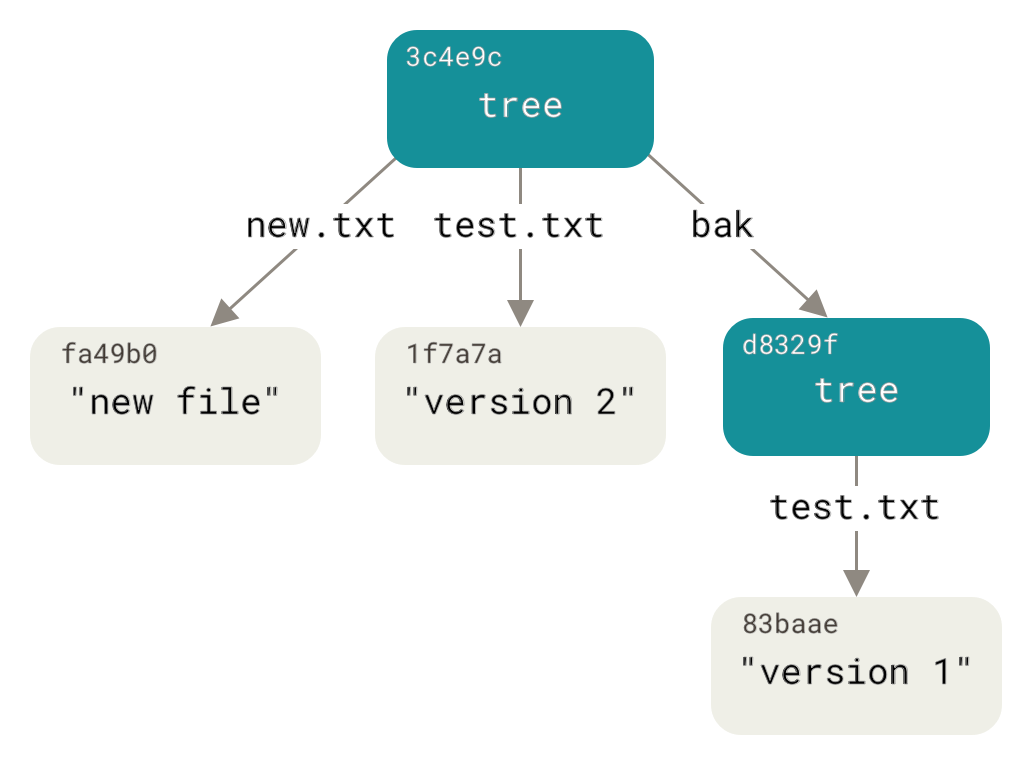
Some important folders inside .git:
objects/ → Where Git stores all data (files, commits, history)
refs/ → Pointers to branches and tags
HEAD → Tells Git which branch you’re currently on
index → Staging area (very important!)
📌 You don’t normally edit these manually, but knowing they exist helps a lot.
3. Git Objects: Blob, Tree, and Commit (Core Concept)
Git stores everything as objects.
There are only three main object types you need to understand.
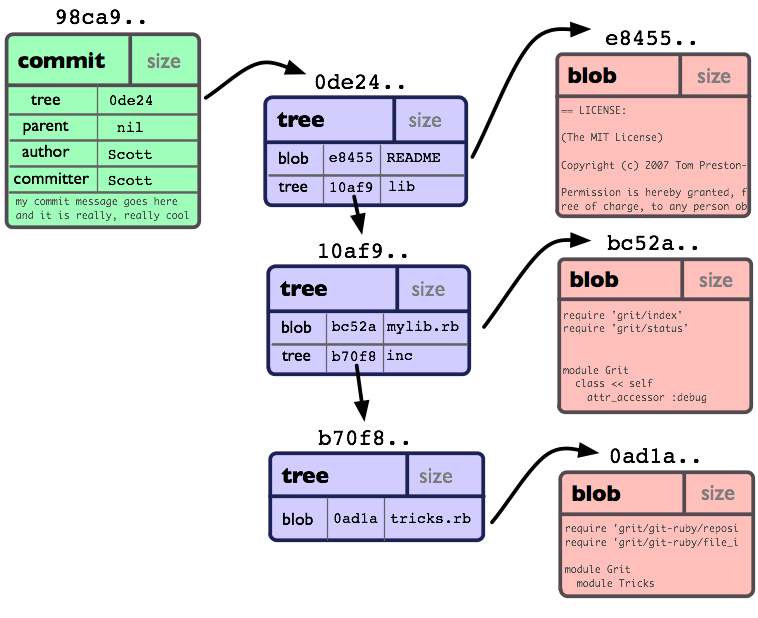
1️⃣ Blob (File Content)
Blob = contents of a file
No filename
No folder info
Just raw data
Example:
Hello World
📌 If two files have the same content, Git stores only one blob.
2️⃣ Tree (Folder Structure)
Tree = directory
Maps:
filenames → blobs
subfolders → other trees
Think of it like:
src/
 ├── index.js → blob
 └── utils.js → blob
📌 Trees define structure, blobs define content.
3️⃣ Commit (Snapshot + Metadata)
A commit contains:
Pointer to a tree (project structure)
Author info
Commit message
Pointer to parent commit
📌 A commit is not a “diff”.
👉 It’s a snapshot of the entire project.
4. Relationship Between Commit, Tree, and Blob
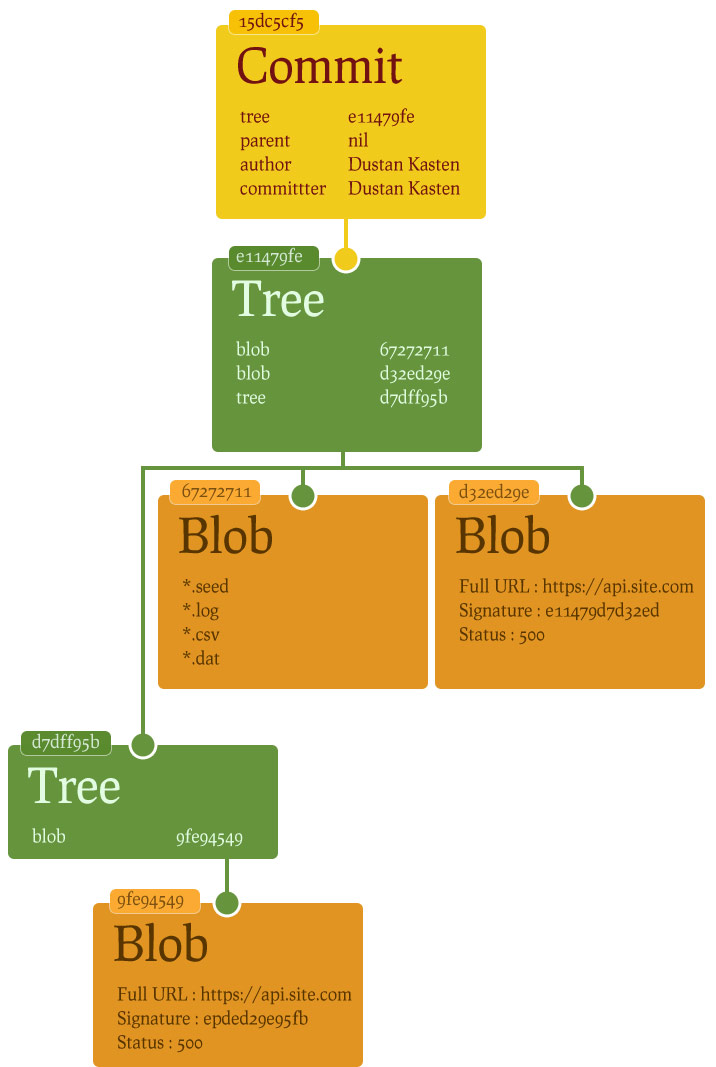
Commit
  ↓
 Tree
  ↓
Blobs (file contents)
Each commit:
Points to one tree
That tree points to blobs and subtrees
Everything is connected using hashes
5. How Git Tracks Changes (The Big Idea)
📌 Git does not track file changes line-by-line like Excel.
Instead, Git:
Takes snapshots
Reuses unchanged blobs
Stores only what is different
This makes Git:
Fast
Efficient
Reliable
6. What Happens Internally During git add
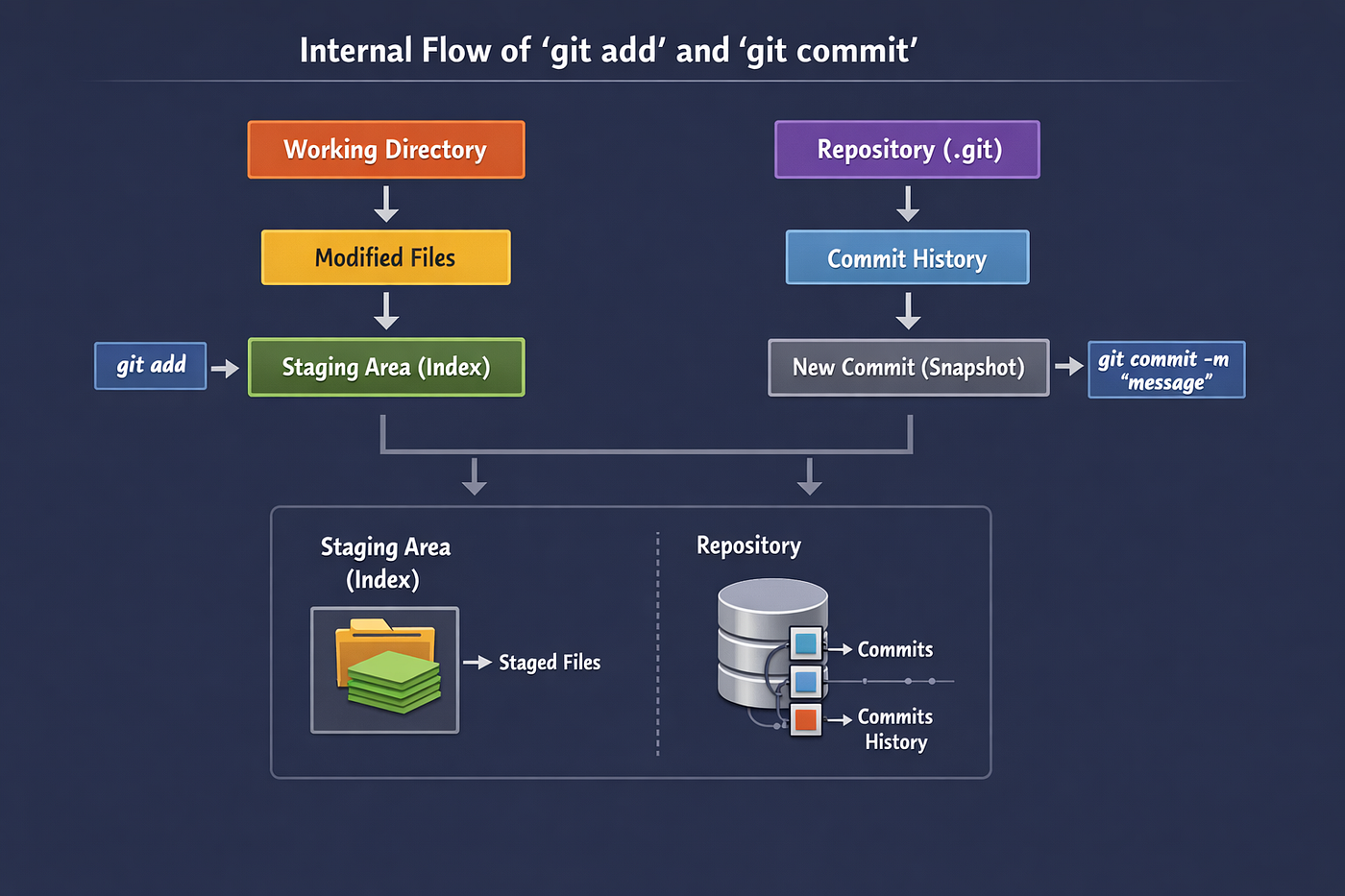
When you run:
git add file.txt
Internally Git does this:
Reads the file content
Creates a blob object
Calculates a hash for the blob
Stores it in
.git/objectsUpdates the index (staging area)
📌 The staging area is just a preview of the next commit.
7. What Happens Internally During git commit

When you run:
git commit -m "message"
Git:
Reads the staging area
Creates tree objects
Creates a commit object
Stores everything in
.git/objectsMoves the branch pointer forward
📌 Nothing is “saved” until commit.git add only prepares.
8. How Git Uses Hashes to Ensure Integrity
Git uses SHA-1 hashes (40-character strings).
Example:
e83c5163316f89bfbde7d9ab23ca2e25604af290
Why hashes are powerful
A hash depends on:
File content
Object type
Metadata
If anything changes, the hash changes.
📌 Benefits:
Detects corruption
Prevents accidental data loss
Guarantees history integrity
This is why:
You can trust Git history
Commits cannot be silently changed
9. Mental Model: How to Think About Git
❌ Don’t think:
“Git stores file changes”
✅ Think:
“Git stores snapshots connected by hashes”
Simple analogy 🏠
Blob = bricks
Tree = rooms
Commit = full house photo
Each commit is a complete house photo, but Git cleverly reuses old bricks.
Conclusion
Understanding Git internally helps you:
Debug issues with confidence
Stop fearing Git errors
Use advanced features naturally
Avoid memorising commands blindly
Once you understand objects, snapshots, and hashes, Git starts making sense.