Sessions vs JWT vs Cookies: Understanding Authentication Approaches
Across the web, every time a user logs into a website, the server needs a way to remember who they are. But computers do not remember people by name. They need a reliable method to identify users across multiple requests.
In this blog we will understand what sessions are, what cookies are, what JWT tokens are, how stateful and stateless authentication differ, and when to use each method in real-world projects.
First, let's understand what is authentication and why it exists.
What is authentication and why does it exist
Authentication is how a website recognizes a user after they log in. When a user like name: "Suprabhat", age: 23 signs into an app, the server needs to know that the next request coming from the browser is still from the same person.
Without authentication, every page click would feel like a new visit. No saved cart, no profile page, no personalized content.
So how do we remember users? Three common approaches are used: Cookies, Sessions, and JWT tokens.
Let's understand each one.
What are cookies and when are they used
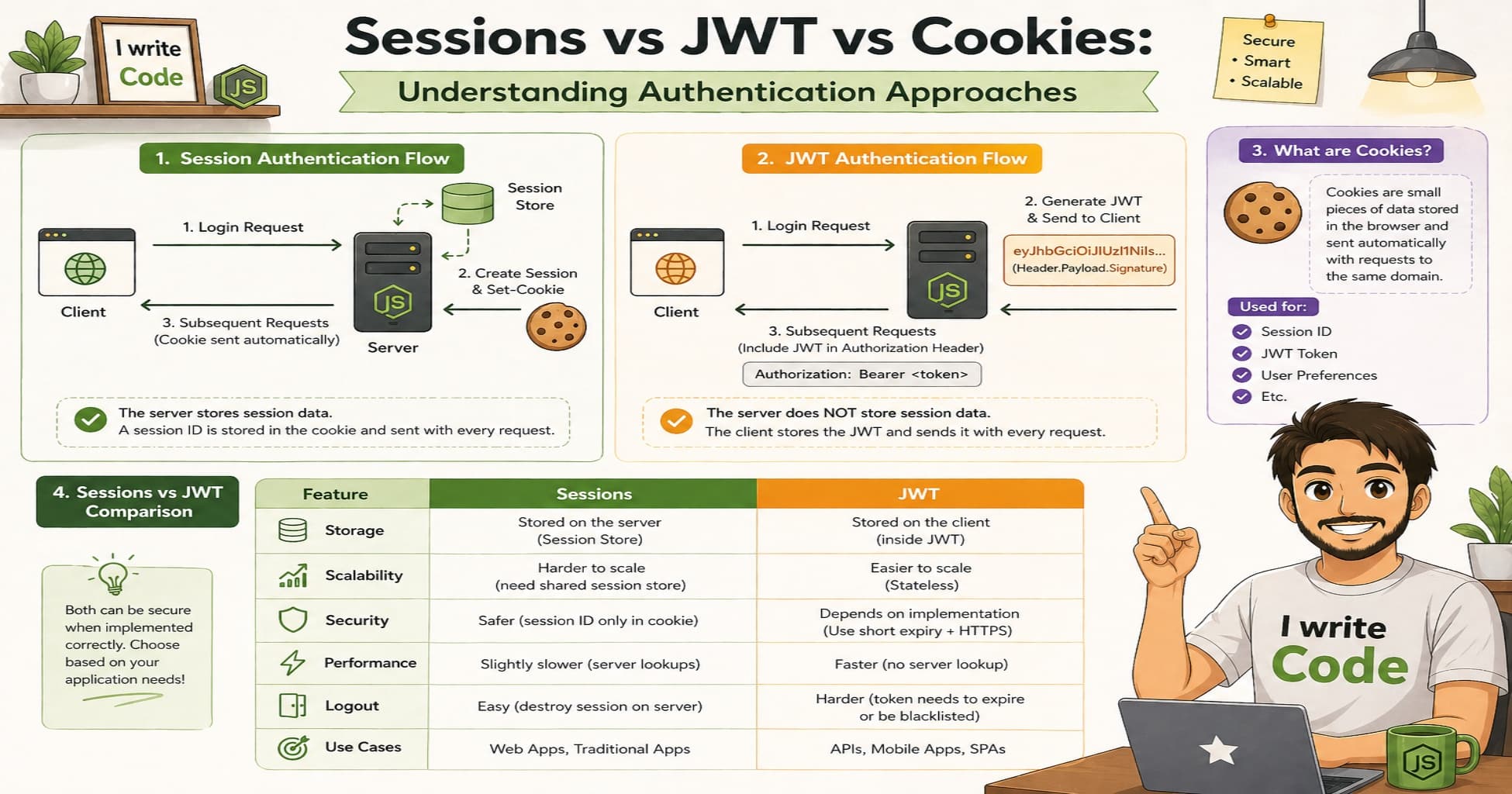
Cookies are small pieces of data stored in the user's browser. When a user logs in, the server can send a cookie to their browser. The browser then automatically includes that cookie in future requests to the same website.
// Server sets a cookie after login
res.cookie('userId', '12345', { maxAge: 24*60*60*1000 });
Cookies are stored on the client side, automatically sent with requests to the same domain, can have expiration times, and are limited to about 4KB of data.
Think of cookies like a library card. You show it each time you visit, and the librarian recognizes you.
When to use cookies:
Remembering simple preferences like theme or language
Storing a session ID or token, not raw user data
Lightweight login persistence on single-domain sites

What are sessions and why do we need them
Sessions store user data on the server. When a user logs in, the server creates a unique session ID and sends it to the client, usually via a cookie. The client sends this ID back with each request, and the server looks up the ID to find the user's data.
How it works:
User logs in, server creates session with sessionId and userId
Server sends sessionId to client via cookie
Client sends sessionId with each request
Server looks up sessionId to find user data
Sessions keep data on the server, the client only holds a simple identifier, they are easy to invalidate by deleting the session, and they require server storage and lookup.
Think of sessions like a coat check. You get a ticket, and the staff keeps your actual coat safe.
When to use sessions:
Traditional server-rendered apps like Django, Rails, or Express with EJS
When you need instant logout or permission updates
Single-domain applications with simple scaling needs

What are JWT tokens and how do they work
JWT, which stands for JSON Web Tokens, are self-contained tokens that encode user information directly inside them. A JWT has three parts: header, payload, and signature. Once issued, the server can verify the token without storing anything.
// Server issues JWT after login
const token = jwt.sign({ userId: 123 }, 'secret', { expiresIn: '1h' });
// Client sends: Authorization: Bearer <token>
JWTs are stateless, meaning no server storage is needed. They contain encoded data, but you should not store secrets in the payload. They are signed to prevent tampering and have built-in expiration via the exp claim.
Think of JWTs like a signed event wristband. The bouncer can verify it is valid just by inspecting the wristband, no list needed.
When to use JWT:
REST APIs or GraphQL backends
SPAs like React, Vue, or Angular, or mobile apps
Microservices or cross-domain authentication
When horizontal scaling is a priority

What is the difference between stateful and stateless authentication
| Aspect | Stateful (Sessions) | Stateless (JWT) |
|---|---|---|
| Server storage | Required | Not needed |
| Scaling | Needs shared store or sticky sessions | Easy to scale horizontally |
| Logout | Simple, delete session | Harder, need short expiry or allowlist |
| Performance | Lookup per request | Signature verify only |
| Best for | Monolithic web apps | APIs, mobile, microservices |
Comparison table: Sessions vs JWT vs Cookies
| Feature | Session-Based | JWT-Based | Cookie-Only |
|---|---|---|---|
| Data location | Server | Token (client) | Client |
| Client stores | Session ID | Full token | Data or ID |
| Server lookup | Yes | No | Sometimes |
| Cross-domain | Limited | Yes with CORS | Same-domain only |
| Mobile friendly | Extra setup | Native support | Not ideal |
| Logout | Simple | Needs planning | Simple |
| Best use | Traditional web apps | APIs, SPAs, microservices | Simple preferences |
Note: Cookies are often used with sessions or JWTs to transport identifiers. They are a delivery method, not a complete auth strategy alone.
When to use each method: real-world decisions
Use Sessions when:
Building a server-rendered website like an admin panel or blog CMS
You need immediate access revocation
Your app runs on one domain
You are learning and want simpler debugging
Example: An internal tool where name: "Suprabhat", age: 23 manages content. Sessions let you revoke access instantly.
Use JWT when:
Building a public API or backend for a mobile app
Your frontend and backend are separate, like SPA plus API
You need authentication across services or domains
You want to scale without shared session storage
Example: A fitness app where users log in once and access APIs from phone, web, and watch. JWTs travel easily in headers.
Use simple Cookies when:
Storing non-sensitive preferences like theme or language
Lightweight remember me for simple sites
Transporting a session ID or token, not the data itself
Example: A news site that remembers your preferred category. A simple cookie is enough.
Conclusion
Authentication does not have to be confusing.
Cookies are small data pieces the browser stores and sends automatically. Sessions keep user data on the server and use a cookie to share an ID. JWTs pack user data into a signed token the server can verify without storage.
Choosing between them depends on your project. Need simplicity and control, go with Sessions. Building APIs or mobile apps, choose JWT. Just remembering preferences, simple cookies work.
Your next step: Build a tiny login with sessions. Then rebuild it with JWT. Compare the experience. Hands-on practice beats any tutorial.
Understanding these basics helps you see how the invisible parts of authentication work every time a user logs in.