Why Version Control Exists: The Pendrive Problem
If you are a student or a new developer, you might think, "Can't I just save my code in a folder and be done with it?"
To explain why that is a terrible idea, let's take a trip down to the Pendrive Era.
The Pendrive Ara: How We Used to Struggle
Imagine you and two friends are building a website for your college fest. You don't know what Git is. So, here is your workflow:
Monday: You write the Home Page code on your laptop. You copy the folder onto a Pendrive.
Tuesday: You give the pendrive to Friend A so they can design the "About Us" page.
Wednesday: Friend A passes the pendrive to Friend B to fix some colors.
The Workflow Looks Like This:
It seems simple, right? Wrong.
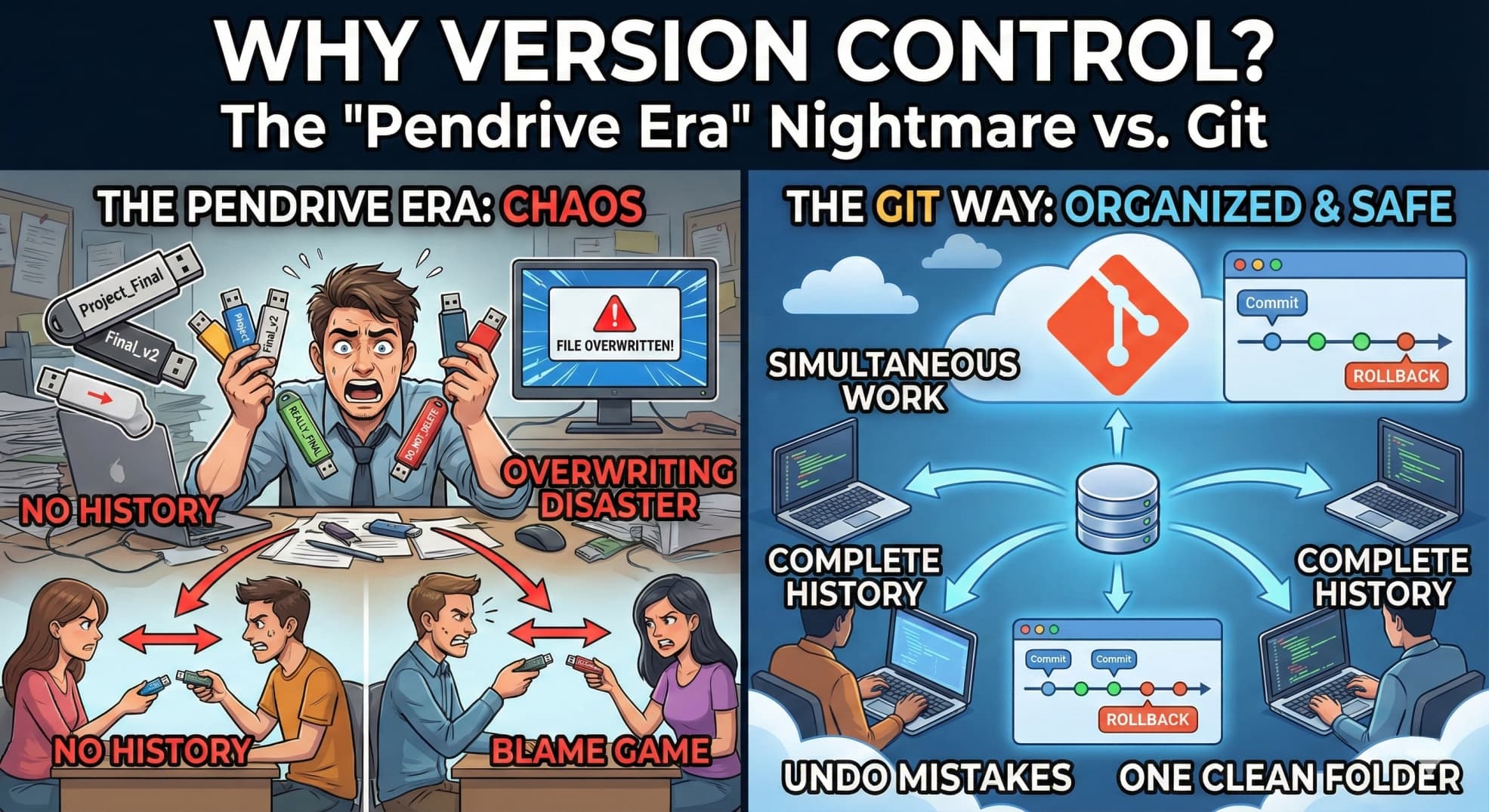
The Problems (The Chaos)
By Friday, chaos start.
1. The "Final_Final_v2" Folder Mess
Friend A didn't want to delete your code, so they saved their changes as a new folder. Friend B did the same. Now, your pendrive looks like this:
Project_FestProject_Fest_FinalProject_Fest_REALLY_FINALProject_Fest_FINAL_v2_DO_NOT_DELETE
You have no idea which folder has the correct code.
2. The "Overwriting" Disaster
While Friend A had the pendrive, you remembered a bug and fixed it on your laptop.
When the pendrive comes back to you, you copy the files back to your laptop.
Boom. You just overwrote your bug fix with the old code from the pendrive. Your fix is gone forever.
3. The "Blame Game"
The website crashes. Someone deleted a critical line of code.
You ask Friend A: "Did you delete it?" -> They say "No."
You ask Friend B: "Did you delete it?" -> They say "No."
There is no history. There is no proof. You have to spend 5 hours finding the missing line because you can't "Undo" the last 3 days of work.
Why This Doesn't Work in the Real World
In a real software company, you aren't working with 2 friends. You are working with 50 developers across different time zones (India, USA, Europe).
You cannot pass a pendrive to someone in California.
You cannot email a 500MB code file back and forth 20 times a day.
If you tried the "Pendrive Method" at a company like Amazon or Google:
Collaboration would stop: Only one person could work at a time.
Data would be lost: One accidental "Save" could wipe out a month of the team's work.
No Safety Net: If a new update breaks the app, you can't instantly "roll back" to yesterday's version.
The Google Drive Myth: "Why Can't We Just Use Cloud?"
At this point, you are probably rolling your eyes and thinking:
"Come on, Nobody uses pendrives anymore! It is the 21st century. We just create a shared Google Drive or Dropbox folder, give everyone access, and work. Problem solved, right?"
Wrong.
While Google Drive is amazing for your Photos, PowerPoint presentations, and PDFs, it is a nightmare for writing code.
Here is why the "Google Drive Method" fails when you are building software.
1. The "Conflicted Copy" Nightmare
Scenario: You and your friend are both working on the same file, index.html.
You work offline at a cafe and change the header.
Your friend works at home and changes the footer.
You both connect to the internet. Google Drive tries to sync.
What happens? Google Drive panics. It doesn't know how to merge the header change and the footer change. It just duplicates the file. Suddenly, you see:
index.htmlindex (Conflicted Copy 2024-10-12).htmlindex (Rohan's MacBook Copy).html
Now you have to manually open all three files, read every line, and paste them together. It’s tedious and dangerous.
How VCS fixes this: VCS is smart. It looks at the specific lines. It sees you changed line 10 and your friend changed line 50. It automatically combines them into one file. No duplicate files. No mess.
2. The "Broken Code" Problem
Software is like a puzzle. File A interacts with File B.
The Google Drive Issue: Imagine you are updating 5 files at once to add a new feature. You save 3 of them, but your internet cuts out before the other 2 save. Your teammate tries to run the project. Because they only have half of your files, the entire project crashes on their laptop.
How VCS/Git fixes this: Git uses "Commits." A commit is atomic, it's all or nothing. Your teammate doesn't see your changes until you finish all of them and say, "Okay, this package is ready." They get the complete, working puzzle, not just half the pieces.
3. Google Drive tracks "Files", VCS tracks "Logic"
If you check the "Version History" on Google Drive, it just says:
Edited by Rahul at 2:00 PM
Edited by Priya at 3:00 PM
It doesn't tell you WHAT they changed or WHY. Did Rahul fix a bug? Did he delete the database connection? You have to open the file to guess.
How VCS fixes this: Git requires a message.
Rahul: "Fixed the login button color"
Priya: "Updated the database password"
You can read the history like a storybook without ever opening the code.
Enter VCS/Git: The Time Machine for Your Code
This is why Version Control Systems (VCS) like Git exist.
Think of Git as a Super-Powered Save System (like in video games).
In a Game: Before you fight a boss, you save your game. If you die, you reload the save point.
In Coding: Before you try a new feature, you "Commit" your code with Git. If you break the app, you just reload the previous commit.
How Git Solves Everything
| The Problem | The Git Solution |
| Overwriting Work | Git warns you if you are about to overwrite someone's code and helps you merge changes safely. |
| "Final_v2" Folders | You have one clean folder. Git manages the history in the background. |
| "Who broke the code?" | Git tracks every single line. You can see exactly who wrote what and when. |
| Backup | You push your code to GitHub (the cloud). If your laptop is stolen, your code is safe. |
Conclusion
Version Control exists because humans make mistakes and collaboration is hard.
Using Git transforms the chaotic "Pendrive Shuffle" into a smooth highway where hundreds of developers can drive (code) at the same time without crashing into each other.
So, stop creating Final_Final_v10 folders. Start using VCS like Git. Your future self (and your teammates) will thank you!
So, the next time you feel lazy to type git commit, just remember: You don't want to be the person searching through Project_Final_v10 at 3 AM!