How DNS Resolution Works
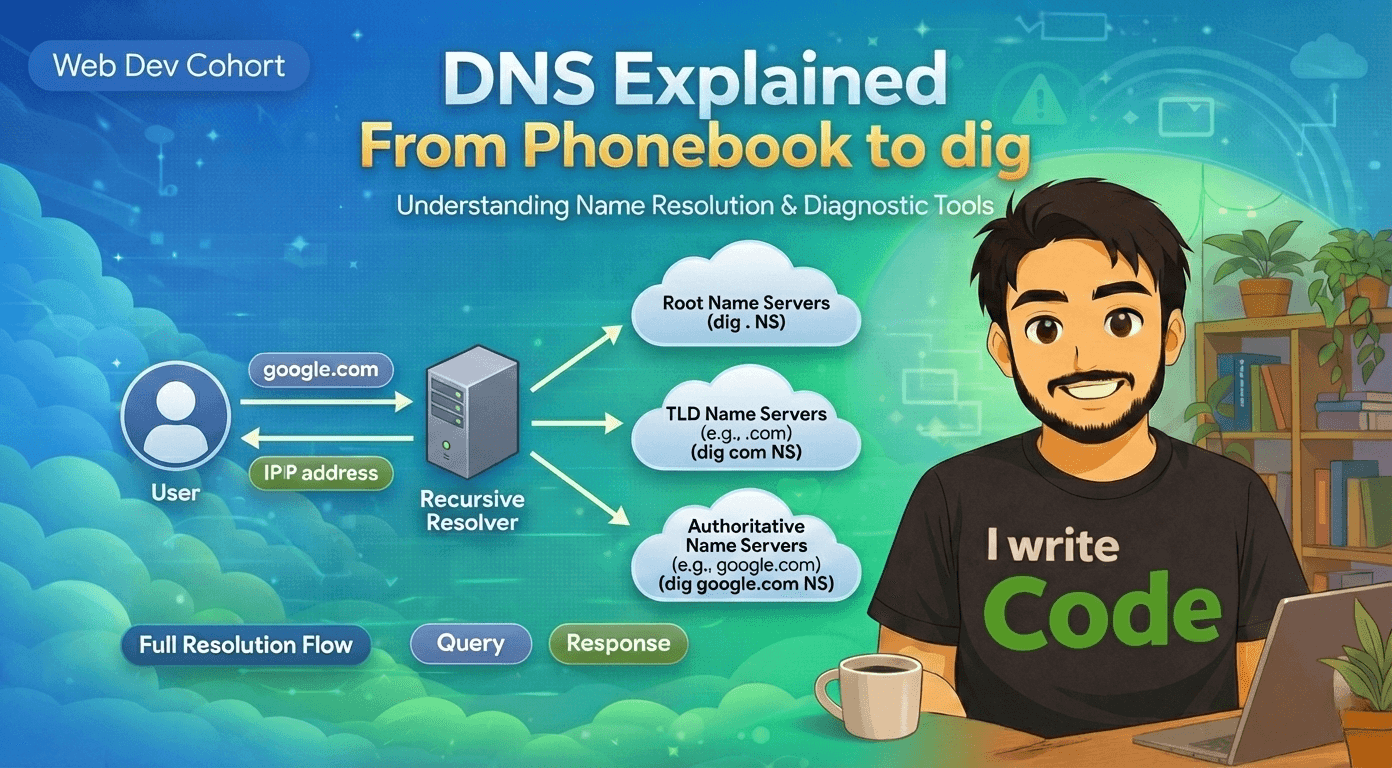
Across the Internet, every website you open uses names like google.com, facebook.com, or amazon.com. But computers do not understand names. They only understand IP addresses. To convert names into IP addresses, we use a system called DNS.
In this blog we will understand what is DNS and why name resolution exists, what is the dig command, how DNS resolution happens step by step using root, TLD, and authoritative name servers, and how this connects to real browser requests.
First, let’s understand what is DNS and why name resolution exists.
What is DNS and why name resolution exists
DNS (Domain Name System) is like the phonebook of the Internet(typical definition). Humans like to remember names such as google.com, but computers need numbers such as 14.1.2.4.
DNS exists to convert domain names into IP addresses. When you type a website name in the browser, DNS finds the correct IP address of that website so your computer can connect to the correct server.
Without DNS, we would need to remember IP addresses for every website, which is not practical.
What is the dig command and when it is used
dig (Domain Information Groper) is a command-line tool used to query DNS servers and inspect how name resolution works.
It is mainly used by developers, system administrators, and network engineers to debug DNS problems, check name servers, and understand how DNS resolution is happening.
Using dig, we can see:
Which name servers are involved
Which records are returned
How the DNS query travels step by step
Now let’s understand how DNS resolution happens in layers.
Understanding dig . NS and root name servers
dig . ns
This command asks: Who are the name servers for the root of the DNS system?
The dot (.) represents the root zone.
Root name servers are the top-level servers in the DNS hierarchy.
They do not know IP addresses of websites.
They only know where to find TLD (Top-Level Domain) servers such as .com, .org, .in
Root servers are the starting point of every DNS lookup.
Understanding dig com NS and TLD name servers
dig com NS
This command asks: Who manages the .com domain?
The response gives the list of TLD name servers responsible for all .com websites.
These servers do not know the IP address of google.com yet.
They only know where the authoritative servers for google.com are located.
So now we move one layer deeper.
Understanding dig google.com NS and authoritative name servers
dig google.com NS
This command asks: Which name servers are responsible for google.com?
The result gives the authoritative name servers for google.com.
These servers are the final authority for google.com.
They store the actual DNS records such as:
IP addresses
Mail servers
Other DNS information
Now we are very close to the final answer.
Understanding dig google.com and the full DNS resolution flow

dig google.com
This command asks directly for the IP address of google.com.
Behind the scenes, the resolver follows this path:
First, it contacts a root server.
Root server replies with TLD servers for .com.Then it contacts a .com TLD server.
TLD server replies with authoritative servers for google.com.Then it contacts an authoritative server for google.com.
Authoritative server replies with the final IP address.
Finally, the resolver returns the IP address to your computer.
Now your browser can connect to the correct web server and load the website.
What NS records represent and why they matter
NS (Name Server) records tell which servers are responsible for a domain.
They are very important because:
They define who controls the domain
They guide the resolver to the correct authoritative servers
Without correct NS records, websites will not resolve
Want to know more about NS records read this blog : What DNS records are and why they exist
How recursive resolvers use this information
Your computer does not directly talk to root servers.
It sends the query to a recursive resolver (usually provided by your ISP or Google DNS).
The recursive resolver:
Starts from root servers
Goes to TLD servers
Goes to authoritative servers
Caches the result for future use
This makes DNS faster and efficient for repeated requests.
Connecting dig google.com to real browser requests
When you type google.com in your browser, the same DNS process happens.
Browser → Recursive Resolver
Resolver → Root → TLD → Authoritative
Authoritative → IP Address returned
Browser → Connects to server using TCP
Website loads
So every web request depends on DNS before any data transfer starts.
Conclusion
DNS is the hidden system that makes the Internet usable by converting names into IP addresses. The dig command helps us see how DNS resolution works step by step, from root servers to authoritative servers.
Understanding this flow gives a clear picture of how browsers find the correct servers and how the Internet routes requests correctly every time you open a website.